
Exponential Growth & Decay Modeling Templates
Loading the math board and drawing, please wait…
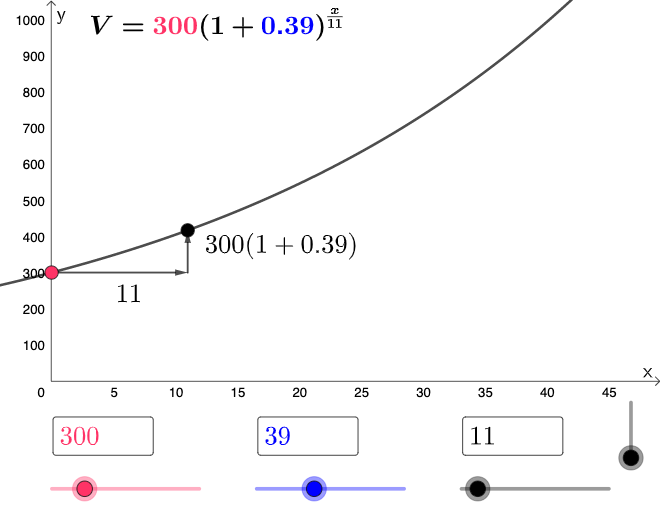
This example demonstrates how to quickly construct exponential growth and decay models using GeoGebra. Key mathematical concepts include exponential functions, coordinate transformations, and similarity transformations. Construction involves using commands like If, Textfield, Vector, and InputBox objects for parameter setting. Suitable for high school students or college freshmen for learning function graphs and modeling practice.
GeoGebra Commands & Parameters
If(b ≟ 1, (a * (1 + p / 100)^(x / n)), b ≟ 2, (a * (1 - p / 100)^(x / n))) → fTextfield(a) → InputBox2Textfield(n) → InputBox3Textfield(p) → InputBox4If(b ≟ 1, (n, (a * (1 + p / 100))), (n, (a * (1 - p / 100)))) → BVector(C, B) → uVector(A, C) → v
AI Drawing Prompt Reference
Draw an exponential growth/decay modeling template. Use parameters a, n, and p, and let b choose between two cases (b=1 for growth, b=2 for decay). Define the function f as an exponential expression in x accordingly. Also compute the key point B as the function value at x=n for the selected case. Then create vector u from point C to point B, and vector v from point A to point C. Display the function together with these vectors in a shared coordinate plane to illustrate how the parameters shape the curve.
The prompt above was compiled from the original drawing commands and is for reference only.