
Exploring Volumes of Rectangular Prisms
Loading the math board and drawing, please wait…
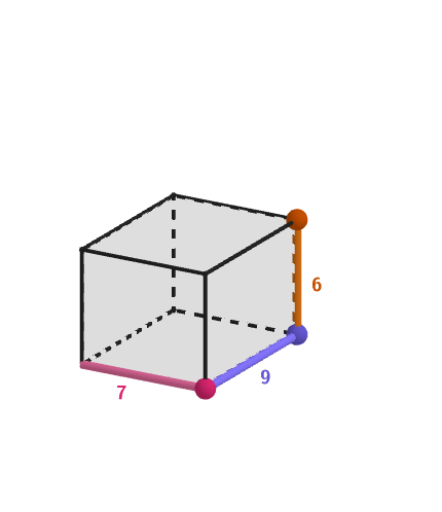
This activity demonstrates how changing the dimensions of a rectangular prism affects its volume calculation. Key math concepts include the volume formula for rectangular prisms: Volume = Base Area × Height. It uses GeoGebra commands like Point, Polygon, Length, Intersect, Prism, Midpoint to construct and dynamically display the volume calculation. Suitable for students in grades 6-8 to learn how to use models to find volumes of prisms and cylinders, and apply in numerical and word problems.
GeoGebra Commands & Parameters
Point(Sequence[(x(A) + t, y(A)), t, 1, 10]) → BPoint(Sequence[(x(B), y(B) + t), t, 1, 10]) → CPolygon(A, B, C, D) → q1, segmLen, segmWid, c, dPoint(Sequence[(x(C), y(C), t), t, 1, 10]) → VLength(segmWid) → widthLength(segmLen) → lengthIntersect(xAxis, yAxis) → OPrism(q1, Sheigth) → e, E, edgeAE, edgeBF, edgeCG, edgeDH, edgeEF, edgeFG, edgeGH, edgeEH, F, G, H, faceABFE, faceBCGF, faceCDHG, faceADHE, faceEFGHMidpoint(A, B) → MABMidpoint(B, C) → MBCMidpoint(C, G) → MGC
AI Drawing Prompt Reference
Draw a rectangular base on a coordinate plane whose side lengths can vary with sliders. Construct the base as a polygon from four points, then create corresponding points above the base along the height direction. Use the base region and a vertical height parameter to build a rectangular prism by extrusion, showing its edges and faces (including the top face). Add labels for the base width and base length, and place a few helper points such as midpoints on key base edges to support the volume relationship.
The prompt above was compiled from the original drawing commands and is for reference only.