
Exploring the Net and Surface Area Formula of a Rectangular Pyramid
Loading the math board and drawing, please wait…
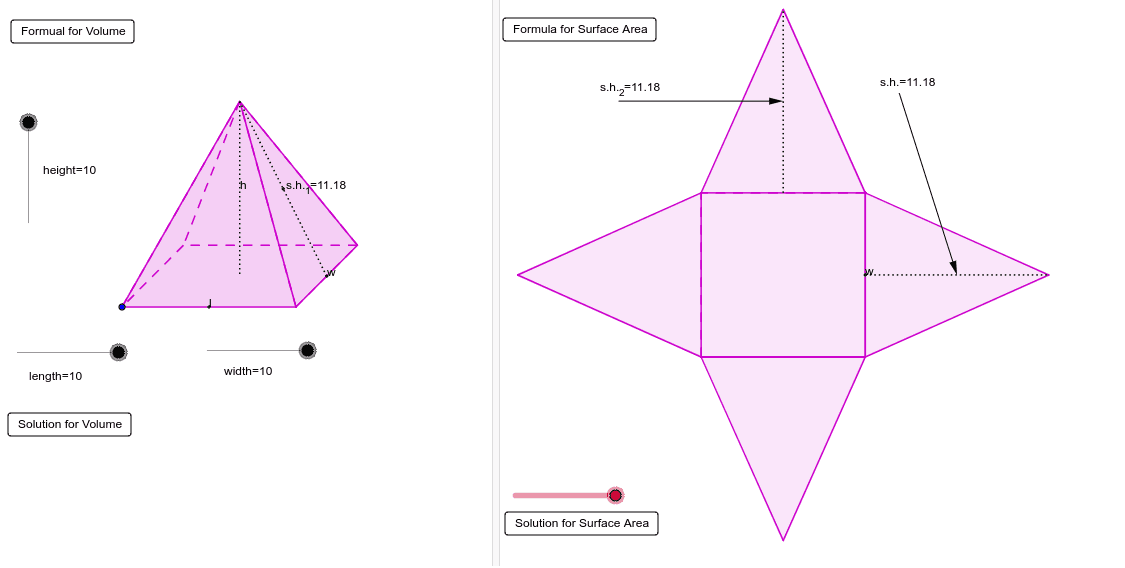
This example demonstrates how to explore the net of a rectangular pyramid and its surface area formula using interactive tools. Key math concepts include solid geometry, polygon area calculation, spatial vectors, and transformations. GeoGebra commands used for construction are Line, Polygon, Vector, Midpoint, Segment, etc., which help build the net and calculate the surface area. Suitable for high school students to understand properties of solid geometric figures and surface area calculations, or for mathematical teaching demonstrations.
GeoGebra Commands & Parameters
Line(J, K) → hCircle(J, width) → gIntersect(g, h, 1) → MVector(J, M) → wTranslate(A, Vector[w / 2]) → CDilate(I, length, H) → LVector(H, L) → vTranslate(C, v) → DMidpoint(C, D) → Q_1Translate(A, v) → BMidpoint(A, B) → YLine(Y, Q_1) → g_1Midpoint(C, B) → NCircle(Q_1, N) → k_1Intersect(k_1, g_1, 2) → V_1Dilate(F, height, E) → GVector(E, G) → uTranslate(N, u) → OPolygon(A, B, D, C) → P, a, b, d, cPolygon(O, C, D) → Q, d_1, o, c_1Polygon(O, A, C) → R, c_2, o_1, a_1Polygon(O, D, B) → S, b_1, o_2, d_2Polygon(O, A, B) → T, b_2, o_3, a_2Midpoint(B, D) → USegment(O, N) → eSegment(O, U) → fMidpoint(O, U) → WMidpoint(O, N) → VIf(height ≤ 5, C) → ZSegment(Z, O) → iSegment(Z, A) → jLine(N, U) → kIntersect(k, c) → E_1OrthogonalLine(E_1, k) → lOrthogonalLine(U, k) → mCircle(E_1, width / 2) → pIntersect(p, l, 2) → F_1OrthogonalLine(F_1, l) → nIntersect(p, l, 1) → G_1OrthogonalLine(G_1, l) → qIntersect(m, n) → H_1Intersect(m, q) → I_1Midpoint(F_1, H_1) → J_1Midpoint(I_1, G_1) → K_1Line(J_1, K_1) → rCircle(E_1, A1) → sMidpoint(H_1, I_1) → L_1Circle(U, A1) → tIntersect(s, k, 1) → M_1Intersect(t, k, 2) → N_1Circle(J_1, A2) → e_1Circle(K_1, A2) → f_1Intersect(e_1, r, 1) → O_1Intersect(f_1, r, 2) → P_1Vector(O, M_1) → z_1Vector(O, N_1) → i_1Midpoint(Q_1, N) → R_1Midpoint(Y, N) → S_1Circle(S_1, O) → q_1Intersect(q_1, g_1, 1) → T_1Vector(T_1, P_1) → u_1Vector(O, T_1) → w_1Vector(A, G_1) → l_1Vector(B, I_1) → n_1Vector(D, H_1) → r_1Circle(V_1, O) → h_1Vector(C, F_1) → s_1Intersect(h_1, g_1, 2) → U_1Vector(O, U_1) → zVector(U_1, O_1) → j_1CircleArc(S_1, O, T_1) → p_1CircleArc(V_1, U_1, O) → t_1CircumcircleArc(M_1, O, N_1) → e_2Center(e_2) → W_1Translate(O, Vector[w_1 * m_1]) → O'Translate(O, Vector[z_1 * (m_1 - 1)]) → O'_1Translate(O, Vector[z * (m_1 - 2)]) → O'_2Translate(O, Vector[i_1 * (m_1 - 3)]) → O'_3Translate(T_1, Vector[u_1 * (m_1 - 4)]) → Z_1Translate(U_1, Vector[j_1 * (m_1 - 4)]) → A_2Ray(S_1, O') → f_2Intersect(p_1, f_2, 1) → C_2If(m_1 ≤ 0, O, If[m_1 < 1, C_2, If[m_1 < 4, T_1, If[m_1 < 5, Z_1, P_1]]]) → B_2Ray(W_1, O'_1) → g_2Intersect(e_2, g_2, 1) → D_2If(m_1 ≤ 1, O, If[m_1 < 2, D_2, M_1]) → E_2Ray(W_1, O'_3) → h_2Intersect(e_2, h_2, 1) → F_2If(m_1 ≤ 3, O, If[m_1 < 4, F_2, N_1]) → G_2Ray(V_1, O'_2) → i_2Intersect(t_1, i_2, 1) → H_2If(m_1 ≤ 2, O, If[m_1 < 3, H_2, If[m_1 < 4, U_1, If[m_1 < 5, A_2, O_1]]]) → I_2Translate(A, Vector[l_1 * (m_1 - 4)]) → A'Translate(B, Vector[n_1 * (m_1 - 4)]) → B'Translate(D, Vector[r_1 * (m_1 - 4)]) → D'Translate(C, Vector[s_1 * (m_1 - 4)]) → C'If(m_1 ≤ 4, A, If[m_1 < 5, A', G_1]) → J_2If(m_1 ≤ 4, C, If[m_1 < 5, C', F_1]) → K_2If(m_1 ≤ 4, D, If[m_1 < 5, D', H_1]) → L_2If(m_1 ≤ 4, B, If[m_1 < 5, B', I_1]) → M_2Polygon(E_2, K_2, J_2) → poly1, j_2, e_3, k_2Polygon(J_2, M_2, B_2) → poly2, b_3, j_3, m_2Polygon(M_2, G_2, L_2) → poly3, l_2, m_3, g_3Polygon(L_2, I_2, K_2) → poly4, k_3, l_3, i_3Polygon(K_2, J_2, M_2, L_2) → poly5, k_4, j_4, m_4, l_4Segment(U, G_2) → n_2Midpoint(U, G_2) → N_2Midpoint(O, U) → O_2Vector(P_2, N_2) → u_2Vector(P_2, O_2) → v_2Segment(N, O) → p_2Midpoint(O, N) → Q_2Segment(A, O) → q_2Segment(B, O) → r_2Segment(D, O) → t_2Segment(C, O) → a_3Segment(U, O) → c_3Midpoint(K_2, L_2) → R_2Segment(R_2, A_2) → d_3Midpoint(Q_2, I_2) → S_2Vector(T_2, S_2) → w_2Segment(J_2, K_2) → f_3
AI Drawing Prompt Reference
Draw the net of a rectangular pyramid, showing how its surface unfolds into multiple polygons, with key points, lines, and vectors labeled to help understand its surface area formula. Start by drawing the rectangular base and four triangular sides, then connect the apex to each base vertex, label midpoints and vectors, and finally use circles and lines to indicate key geometric elements, demonstrating the relationship between the unfolded net and the 3D figure.
The prompt above was compiled from the original drawing commands and is for reference only.