
Exploring the Isosceles Trapezoid: Construction and Properties
Loading the math board and drawing, please wait…
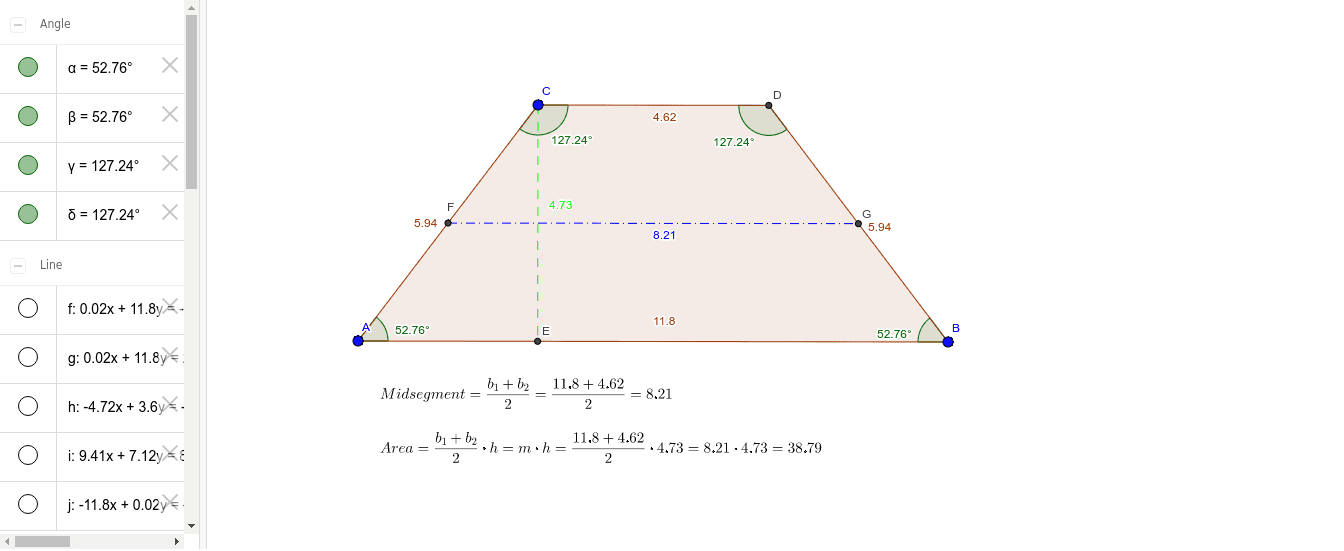
This GeoGebra example dynamically demonstrates the construction and key geometric properties of an isosceles trapezoid. It uses commands such as Line, Angle, Rotate, Intersect, OrthogonalLine, Polygon, Segment, and Midpoint to build the trapezoid step by step, including auxiliary lines and labeled angles. The construction highlights that an isosceles trapezoid has equal legs, equal base angles, and congruent diagonals. Key steps involve drawing base and leg segments, applying rotation to ensure symmetry, finding intersection points and perpendiculars, and marking midpoints for additional structure. This resource is ideal for middle and high school geometry classes, helping students understand definitions, properties, and construction techniques, while also fostering logical reasoning and spatial visualization skills.
GeoGebra Commands & Parameters
Line(A, B) → fLine(C, f) → gLine(A, C) → hAngle(f, h) → αRotate(A, (-α), B) → A'Angle(A', B, A) → βLine(A', B) → iIntersect(g, i) → DOrthogonalLine(C, f) → jIntersect(f, j) → EPolygon(C, D, B, A) → poly1, c, d, b, aSegment(C, E) → kMidpoint(a) → FMidpoint(d) → GSegment(F, G) → lAngle(A, C, D) → γAngle(C, D, B) → δ
AI Drawing Prompt Reference
Draw an isosceles trapezoid. Start with a horizontal base segment. Choose a point above it and draw a line through that point parallel to the base. Connect one endpoint of the base to the upper point to form a leg. Measure the angle between this leg and the base, then rotate the leg around the base endpoint by the negative of that angle to create the symmetric opposite leg. Extend this rotated leg until it meets the parallel line, marking the fourth vertex. Drop a perpendicular from this vertex to the base and mark the foot. Connect the four vertices to form the trapezoid. Mark the midpoints of the two legs and connect them to show the midsegment. Finally, label the two angles formed by the diagonals at the vertices to illustrate equal base angles and congruent diagonals.
The prompt above was compiled from the original drawing commands and is for reference only.