
Exploring the Rectangle
Loading the math board and drawing, please wait…
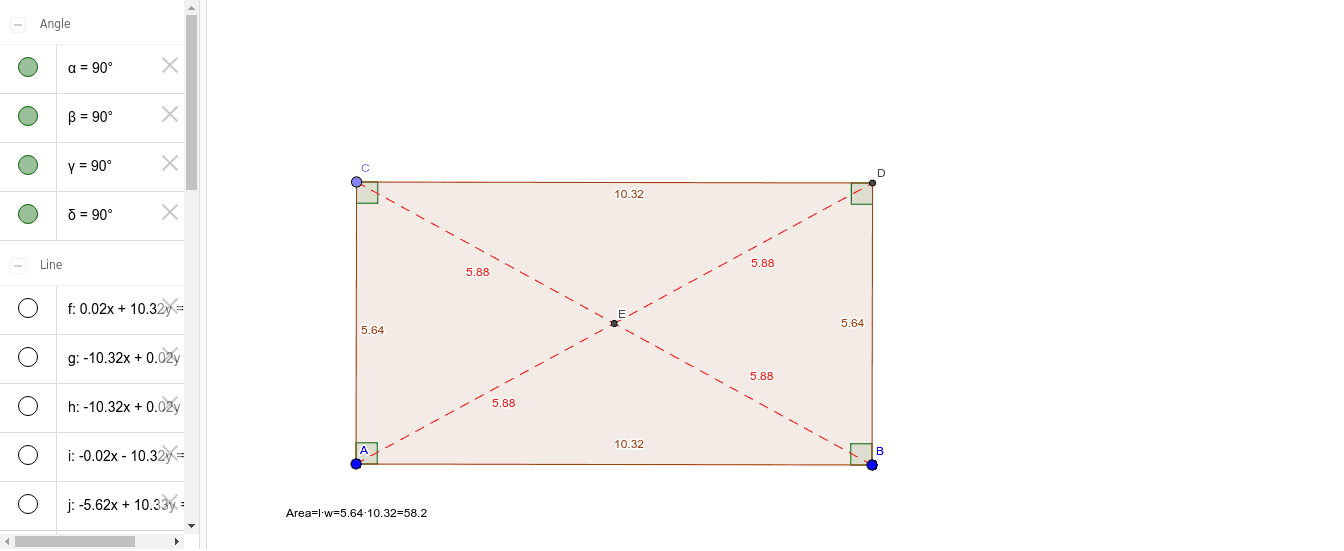
This example demonstrates the geometric properties and related mathematical concepts of a rectangle. Core concepts include the definition of a rectangle, properties of diagonals, area calculation, and coordinate geometry. It is constructed using GeoGebra commands such as Line, OrthogonalLine, Point, Intersect, Polygon, Segment, and Angle. Suitable for high school mathematics teaching or self-study, helping to understand geometric constructions and property exploration.
GeoGebra Commands & Parameters
Line(A, B) → fOrthogonalLine(A, f) → gOrthogonalLine(B, f) → hPoint(g) → COrthogonalLine(C, g) → iIntersect(h, i) → DPolygon(C, D, B, A) → poly1, c, d, b, aLine(A, D) → jLine(C, B) → kIntersect(j, k) → ESegment(A, E) → lSegment(E, D) → mSegment(C, E) → nSegment(B, E) → pAngle(B, A, C) → αAngle(D, B, A) → βAngle(C, D, B) → γAngle(A, C, D) → δ
AI Drawing Prompt Reference
Draw a rectangle with four vertices A, B, C, and D. First, draw line segment AB. Then, draw two perpendicular lines from A and B to AB, intersecting at points C and D. Connect A to C, C to D, D to B, and B to A to form the rectangle. Next, draw diagonals AD and BC, which intersect at point E. Finally, draw line segments AE, ED, EC, and EB.
The prompt above was compiled from the original drawing commands and is for reference only.