
Exploring the Areas of Two Opposite Quadrilaterals
Loading the math board and drawing, please wait…
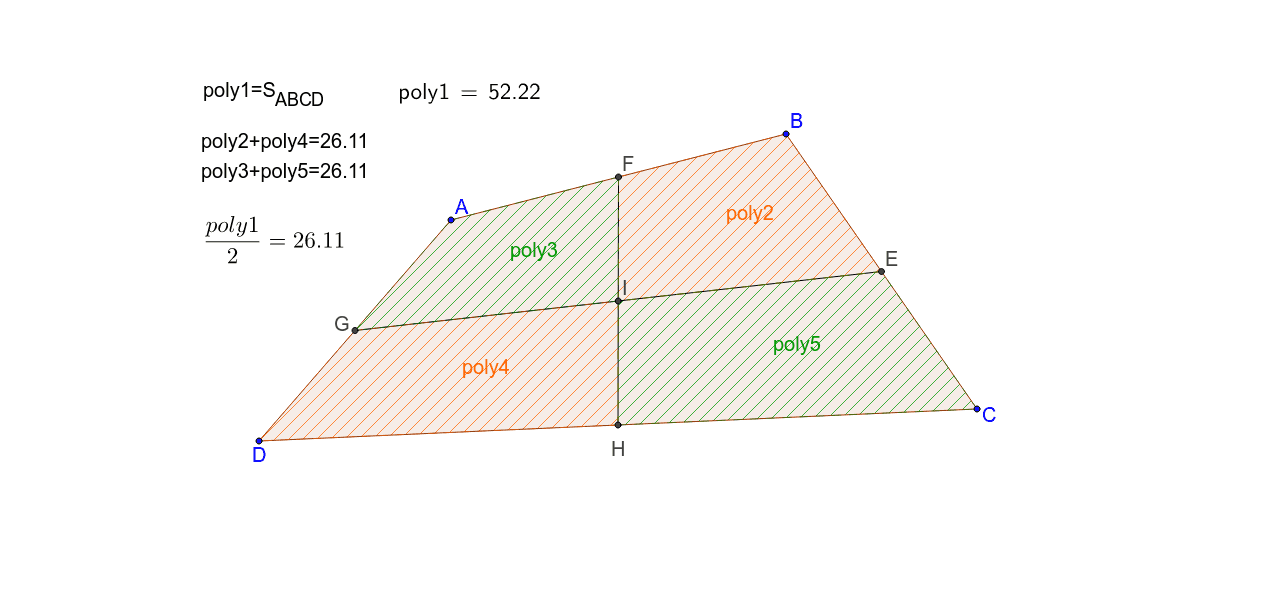
This GeoGebra example dynamically demonstrates the area relationship between two opposite quadrilaterals formed within a larger quadrilateral by connecting midpoints and diagonal intersections. The core mathematical concepts include quadrilateral area, midpoints, line segments, intersections, and area identities or optimization problems, often involving parabolas, secant lines, and rhombus properties. The construction uses commands such as Polygon to create the base quadrilateral ABCD, Midpoint to find side midpoints, Segment to draw connecting lines, and Intersect to locate intersection points, resulting in multiple sub-quadrilaterals (poly2 to poly5) with LaTeX text labels for areas. This resource is suitable for high school or college students studying plane geometry, coordinate geometry, and optimization, and can be used for classroom demonstrations or independent exploration of how areas change with dynamic parameters.
GeoGebra Commands & Parameters
Polygon(A, B, C, D) → poly1, a, b, c, dMidpoint(b) → EMidpoint(a) → FMidpoint(d) → GMidpoint(c) → HSegment(F, H) → eSegment(G, E) → fIntersect(e, f) → IPolygon(F, B, E, I) → poly2, f_1, b_1, e_1, iPolygon(A, F, I, G) → poly3, a_1, f_2, i_1, gPolygon(G, I, H, D) → poly4, g_1, i_2, h, d_1Polygon(E, I, H, C) → poly5, e_2, i_3, h_1, c_1LaTeX(poly1, true, true) → text2
AI Drawing Prompt Reference
Draw an arbitrary quadrilateral with four vertices. Mark the midpoint of each side. Connect the midpoints of opposite sides to create two crossing segments, and mark their intersection point inside the quadrilateral. Using this intersection point and the adjacent side midpoints as vertices, construct four smaller quadrilaterals, each located at one corner of the original shape. Shade or color these four sub-quadrilaterals distinctly, and label each with its area value. The figure should illustrate the relationship between the areas of the two opposite sub-quadrilaterals.
The prompt above was compiled from the original drawing commands and is for reference only.