
Exploring Tangram Geometry with GeoGebra
Loading the math board and drawing, please wait…
In collections
Tangram & Maths
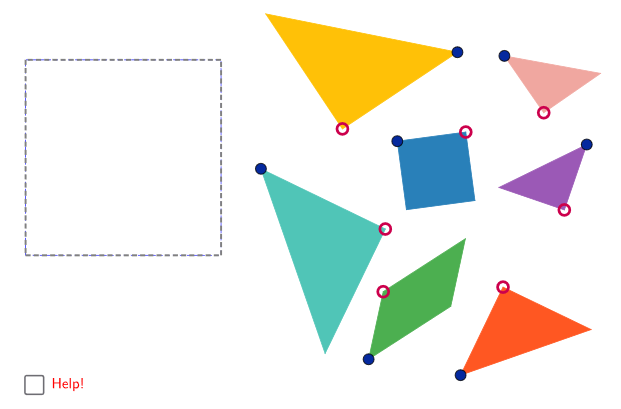
This GeoGebra example demonstrates how a Tangram set (seven polygonal pieces) can be constructed and then transformed to form different target figures. It highlights the key phenomenon that the same collection of basic shapes can be rearranged—by geometric transformations—while preserving congruence properties and area relationships. The mathematical ideas include polygonal decomposition, constructing shapes from intersections, and using rotations to position pieces precisely for拼合 (tiling/pattern formation). In the construction, the example relies on Polygon to create the tangram pieces (e.g., poli1, poli2, poli3, poli4); Segment and Line to define edges and auxiliary straight lines; Midpoint and Intersect to compute critical vertices that determine the boundaries of the pieces (using objects like a_1, b_1, c_1, g_1 and reference frames frame1–frame5); and Rotate to carry out the transformation of pieces into the required configurations (objects such as j/J, N/O/P, and K/L/M help specify the placement targets). Suitable for middle and high school geometry, classroom activities on geometric construction and transformation, and student exploration of how complex patterns emerge from simple polygons.
GeoGebra Commands & Parameters
Polygon(A, B, 4) → poli1, frame3, frame4, frame1, frame2, C, DSegment(A, C) → frame12Midpoint(D, C) → EMidpoint(D, A) → FSegment(F, E) → frame5Midpoint(A, C) → GSegment(B, G) → frame9Midpoint(F, E) → HMidpoint(G, C) → ISegment(H, I) → frame7Segment(G, H) → frame8Line(F, frame8) → jIntersect(j, frame12) → JSegment(F, J) → frame11Polygon(A, G, B) → poli2, b_1, a_1, g_1Point(Circle[N, b_1]) → ORotate(O + (a_1, 0), Angle[B - G] + Angle[O - N] - Angle[G - A], O) → PPolygon(N, O, P) → poli4, p, n, oPolygon(B, G, C) → poli3, c_1, b_2, g_2Point(Circle[K, c_1]) → LRotate(L + (b_2, 0), Angle[C - G] + Angle[L - K] - Angle[G - B], L) → MPolygon(K, L, M) → poli5, m, k_1, lPolygon(H, E, C, I) → poli6, h_1, e_1, c_2, i_1Point(Circle[Q, h_1]) → RRotate(R + (e_1, 0), Angle[C - E] + Angle[R - Q] - Angle[E - H], R) → SRotate(S + (c_2, 0), Angle[I - C] + Angle[S - R] - Angle[C - E], S) → TPolygon(Q, R, S, T) → poli7, q, r, s, tPolygon(H, G, I) → poli8, i_2, h_2, g_3Point(Circle[U, i_2]) → VRotate(V + (h_2, 0), Angle[I - G] + Angle[V - U] - Angle[G - H], V) → WPolygon(U, V, W) → poli9, w, u, vPolygon(F, H, G, J) → poli10, f_1, h_3, g_4, j_1Point(Circle[Z, f_1]) → A_1Rotate(A_1 + (h_3, 0), Angle[G - H] + Angle[A_1 - Z] - Angle[H - F], A_1) → B_1Rotate(B_1 + (g_4, 0), Angle[J - G] + Angle[B_1 - A_1] - Angle[G - H], B_1) → C_1Polygon(Z, A_1, B_1, C_1) → poli11, z, a_2, b_3, c_3Polygon(F, J, A) → poli12, a_3, f_2, j_2Point(Circle[D_1, a_3]) → E_1Rotate(E_1 + (f_2, 0), Angle[A - J] + Angle[E_1 - D_1] - Angle[J - F], E_1) → F_1Polygon(D_1, E_1, F_1) → poli13, f_3, d_1, e_2Polygon(F, D, E) → poli14, e_3, f_4, d_2Point(Circle[G_1, e_3]) → H_1Rotate(H_1 + (f_4, 0), Angle[E - D] + Angle[H_1 - G_1] - Angle[D - F], H_1) → I_1Polygon(G_1, H_1, I_1) → poli15, i_3, g_5, h_4
AI Drawing Prompt Reference
Draw a tangram puzzle composed of seven polygonal pieces. Use geometric transformations such as rotation to assemble the basic shapes—a large rhombus, four corner triangles, two rectangles, and two squares—into a complete figure. The construction order involves creating the base pieces and then rotating them to fit into the target configuration, highlighting the principles of shape rearrangement and area preservation.
The prompt above was compiled from the original drawing commands and is for reference only.