
Exploring Symmetry with Two-Dimensional Shapes and Images
Loading the math board and drawing, please wait…
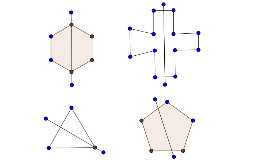
This activity is designed to explore the symmetry of two-dimensional shapes and images, suitable for fourth-grade students. It uses GeoGebra commands like Polygon and Segment to dynamically explore the symmetry of shapes.
GeoGebra Commands & Parameters
Polygon(A, B, 6) → poly1, a, F, b, c, d, e, f, C, D, EPolygon(G, H, 3) → poly2, g, h, i, ISegment(J, K) → jSegment(L, M) → kPolygon(N, O, 5) → poly3, l, m, n, p, q, P, Q, RSegment(S, T) → rSegment(U, V) → sSegment(V, W) → tSegment(U, Z) → a_1Segment(Z, A_1) → b_1Segment(A_1, Z) → c_1Segment(A_1, B_1) → d_1Segment(B_1, C_1) → e_1Segment(B_1, C_1) → f_1Segment(C_1, D_1) → g_1Segment(D_1, E_1) → h_1Segment(E_1, F_1) → i_1Segment(F_1, G_1) → j_1Segment(G_1, H_1) → k_1Segment(H_1, W) → l_1Segment(I_1, J_1) → m_1Segment(J_1, I_1) → n_1
AI Drawing Prompt Reference
Draw a hexagon and a triangle, then connect their corresponding vertices to form a symmetrical pattern. Start by drawing a hexagon, then a triangle, and finally connect the corresponding vertices of the two shapes to create a symmetrical design.
The prompt above was compiled from the original drawing commands and is for reference only.