
Exploring Surfaces and Splines
Loading the math board and drawing, please wait…
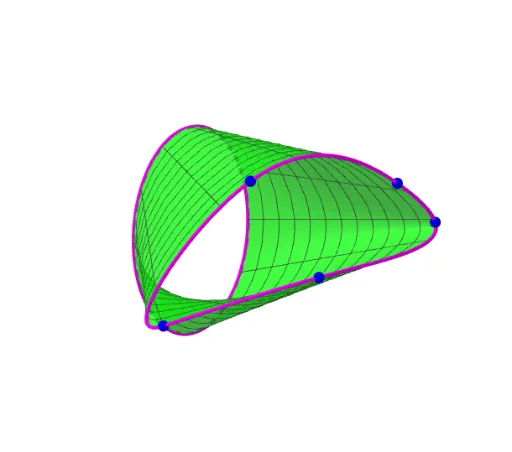
This example demonstrates the construction and manipulation of surfaces and spline functions using GeoGebra, visually showcasing their geometric forms and variation patterns. Core mathematical concepts include surfaces, scatter plots, symmetry, subtraction, kite shapes, and upper and lower sums or Riemann sums. The construction highlights the use of GeoGebra commands/objects like Spline, Point, CurveCartesian, and Surface. Suitable for high school and above, it aids in understanding Riemann sums and function approximation in calculus.
GeoGebra Commands & Parameters
Spline({A, B, C, D, E, A}, 3) → aPoint(yAxis) → FCurveCartesian((2 * cos(((2 * π) * t))), -3, (3 * sin(((2 * π) * t))), t, 0, 1) → bSurface((u * x(a(t))) + ((1 - u) * x(b(t))), (u * y(a(t))) + ((1 - u) * y(b(t))), (u * z(a(t))) + ((1 - u) * z(b(t))), t, 0, 1, u, 0, 1) → c
AI Drawing Prompt Reference
Draw a cubic spline curve a using points A, B, C, D, and E. Then place a point F on the y-axis. Next, draw a parametric curve b, which is a spiral around the origin. Finally, create a surface c that connects curves a and b, showing how the surface is formed by these two curves.
The prompt above was compiled from the original drawing commands and is for reference only.