
Exploring Rotations of a Polygon in the Coordinate Plane
Loading the math board and drawing, please wait…
In collections
Rotations
Grade 8 Congruence and Transformations
translation along a vector
Rotations in the coordinate plane
Rotations
Rotations
Translations - discovery
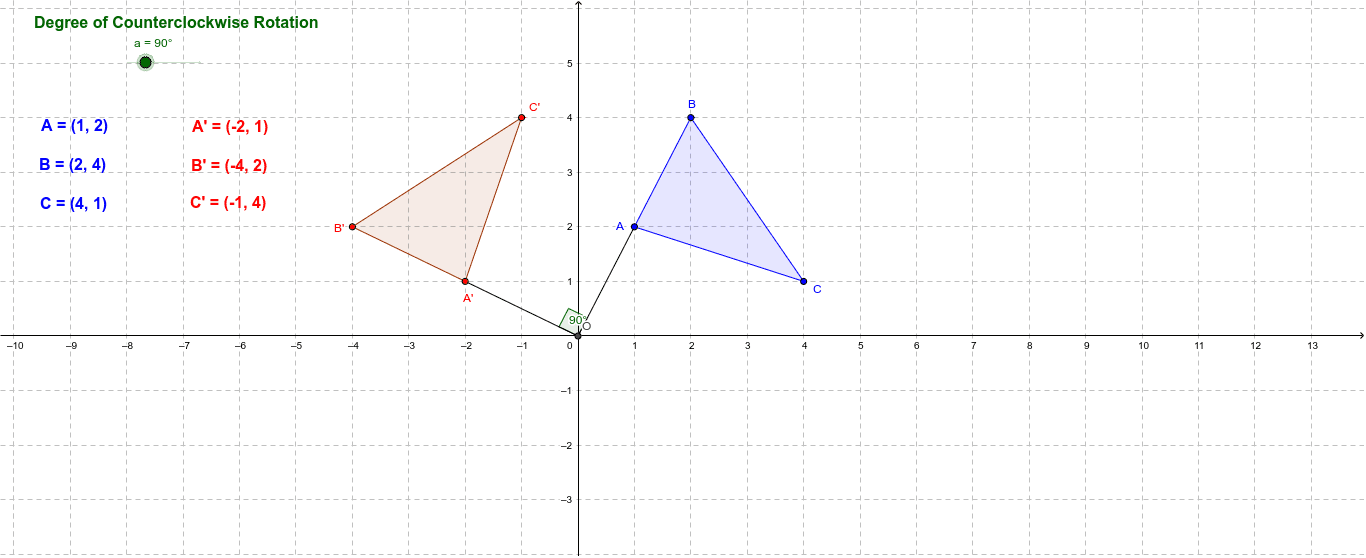
This interactive GeoGebra applet lets students explore how a polygon rotates around a point in the coordinate plane. By manipulating a slider for the rotation angle α, learners can observe the transformation in real time, see the pre‑ and post‑rotation shapes, and read the angle measure. The construction uses GeoGebra commands such as Polygon, Rotate, Segment, and Angle to define vertices A, B, C, create the original polygon, apply the rotation, and display angle labels. The activity is designed for middle‑school and high‑school students studying geometric transformations, coordinate geometry, and angle measurement, and it can be used in classroom demonstrations or for independent inquiry.
GeoGebra Commands & Parameters
Polygon(A, B, C) → poly1, c, a_1, bIntersect(xAxis, yAxis) → ORotate(A, a, O) → A'Rotate(B, a, O) → B'Rotate(C, a, O) → C'Polygon(A', B', C') → poly1', c', a', b'Segment(A, O) → dSegment(O, A') → eAngle(A, O, A') → α
AI Drawing Prompt Reference
Draw a triangle ABC, then rotate the triangle around the origin O by angle α. First, draw triangle ABC, then create the origin O, rotate each vertex of the triangle, and finally draw the rotated triangle A'B'C' and label the rotation angle α.
The prompt above was compiled from the original drawing commands and is for reference only.