
Net of a Rectangular Prism Exploration
Loading the math board and drawing, please wait…
In collections
Cuboids & their Nets
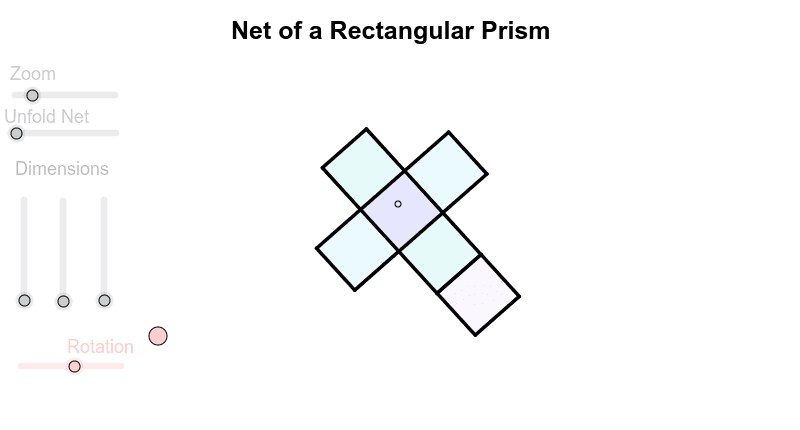
This example demonstrates the net of a rectangular prism and its structural relationships. Core math concepts include polygons, solid geometry, and spatial visualization. Construction highlights involve commands like Sequence, Element, Polygon, Segment to draw the net's faces, and transformation commands (R_x, R_y, R_z) for 3D-to-2D unfolding. Suitable for middle school and above students to understand solid geometry and polygon relationships, enhancing spatial reasoning skills.
GeoGebra Commands & Parameters
Sequence(Mat * Element[cube, k], k, 1, 8) → cube'Element(Element[AE, 3], 1) → droiteSequence(I + (Element[cube', k, 1, 1], Element[cube', k, 2, 1]), k, 1, 8) → listepointsElement(listepoints, 2) → AElement(listepoints, 1) → EElement(listepoints, 4) → C_1Element(listepoints, 3) → DPolygon(A, E, C_1, D) → poly1, a_1, b, c_1, dElement(listepoints, 6) → BElement(listepoints, 7) → FElement(listepoints, 8) → GElement(listepoints, 5) → HPolygon(B, F, G, H) → poly2, e, f, g, hElement(listepoints, 3) → CPolygon(F, C, A, B) → poly3, f_1, i, a_2, b_1Element(AB, 3, 1) → avantPolygon(C_1, G, H, E) → poly4, c_2, g_1, h_1, e_1Element(AC, 3, 1) → dessusPolygon(F, C, C_1, G) → poly5, f_2, c_3, c_4, g_2Polygon(A, B, H, E) → poly6, a_3, b_2, h_2, e_2Segment(E, A) → cSegment(A, C) → jSegment(A, B) → kSegment(C, C_1) → lSegment(C_1, E) → mSegment(A, B) → pSegment(B, H) → qSegment(H, E) → rSegment(H, G) → sSegment(B, F) → tSegment(G, C_1) → d_1Segment(F, G) → i_1Segment(F, C) → j_1Polygon(A, B, F', D') → poly7, a_4, b_3, f', d'Polygon(E, A, D'', C') → poly8, e_3, a_5, d'', c'Polygon(B, F'', G', H) → poly9, b_4, f'', g', h_3Polygon(H, G'', C''', E) → poly10, h_4, g'', c''', e_4Polygon(A_2, B_2, G'', C''') → poly11, a_6, b_5, g''_1, c'''_1
AI Drawing Prompt Reference
Draw the net of a rectangular prism with six rectangular faces, connected by lines to show the 3D structure. Start by sketching three rectangles, then add the remaining three to form a clear, unfoldable layout that highlights the spatial relationships of the prism.
The prompt above was compiled from the original drawing commands and is for reference only.