
Exploring Rotations in the Coordinate Plane
Loading the math board and drawing, please wait…
In collections
Transformations! (Geometry)
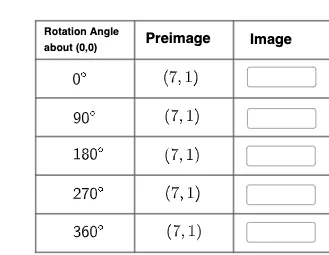
This example demonstrates rotations in the coordinate plane. Key mathematical concepts include geometric transformations, coordinate geometry, and rotation. Construction involves using GeoGebra commands like Polygon, Point, Midpoint, Intersect, and objects such as text1, A, B, C. Suitable for middle or high school mathematics to understand the geometric significance of rotation and its coordinate representation.
GeoGebra Commands & Parameters
Polygon(A, B, C, D) → q1, a, b, c, dPoint(d) → EPoint(b) → FMidpoint(a) → GIntersect(a, d) → HIntersect(a, b) → IIntersect(c, d) → JIntersect(b, c) → KMidpoint(G, H) → LMidpoint(G, I) → MMidpoint(J, K) → NMidpoint(N, J) → OMidpoint(N, K) → PSegment(L, O) → gSegment(N, G) → hSegment(P, M) → iMidpoint(H, D) → QPoint(d) → RPoint(d) → SPoint(d) → TPoint(d) → UPoint(b) → VPoint(b) → WPoint(b) → ZPoint(b) → A_1Point(b) → B_1Segment(R, B_1) → fSegment(A_1, S) → jSegment(Q, Z) → kSegment(T, W) → lSegment(U, V) → mTextfield() → InputBox5Textfield() → InputBox6Textfield() → InputBox7Textfield() → InputBox8Textfield() → InputBox10Textfield() → InputBox11Textfield() → InputBox12Textfield() → InputBox13
AI Drawing Prompt Reference
Draw a quadrilateral ABCD on the coordinate plane and rotate it around point D. First, draw quadrilateral ABCD, then create points E, F, G, H, I, J, K, and calculate the midpoints L, M, N, O, P of its sides. Connect these midpoints to form a new shape. Finally, rotate quadrilateral ABCD around point D to create points R, S, T, U, V, W, Z, A_1, B_1, and connect them to form another new shape.
The prompt above was compiled from the original drawing commands and is for reference only.