
Exploring Rotations in the Coordinate Plane by Tim Brzezinski (4)
Loading the math board and drawing, please wait…
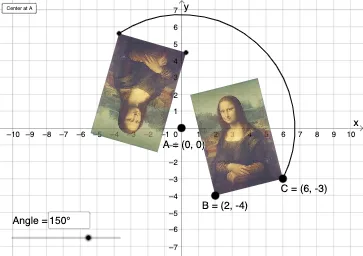
This example demonstrates rotations in the coordinate plane. Key mathematical concepts include rotation and geometric transformations. Using GeoGebra commands such as Rotate, Translate, and Mirror, the construction of rotated figures is shown. Suitable for students at the middle school level and above to learn about geometric transformations.
GeoGebra Commands & Parameters
Vector(D, E) → uTranslate(pic1, u) → pic1'Translate(B, u) → B'Translate(C, u) → C'Vector(B, B') → vRotate(C, δ, A) → C'_1CircleArc(A, C'_1, C) → cCircleArc(A, C, C'_1) → dCircle(A, C) → eLine(F, G) → fMirror(pic1, f) → pic1'_2Mirror(B, f) → B'_2Mirror(C, f) → C'_2Dilate(pic1, k, A) → pic1'_3Dilate(B, k, A) → B'_3Dilate(C, k, A) → C'_3Rotate(B, δ, A) → B'_1Rotate(pic1, δ, A) → pic1'_1Circle(A, C) → pCircleArc(A, C'_1, C) → rTextfield(δ) → InputBox1Textfield(k) → InputBox2Intersect(q, eq1) → H
AI Drawing Prompt Reference
Start with an initial shape, then define a vector from one point to another. Use this vector to translate the initial shape and certain points to create shifted copies. Rotate one point around a center point by a specific angle and draw circular arcs showing this rotation. Create a line and reflect all objects across this line to produce mirrored versions. Finally, dilate all objects from the center point by a scale factor. The construction demonstrates four geometric transformations: translation, rotation, reflection, and dilation.
The prompt above was compiled from the original drawing commands and is for reference only.