
Exploring Rotations in the Coordinate Plane by Tim Brzezinski (2)
Loading the math board and drawing, please wait…
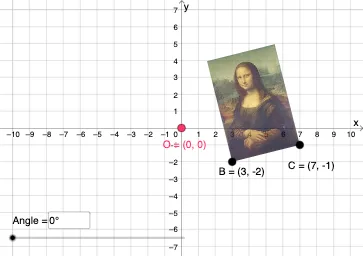
This example demonstrates geometric transformations involving rotations in the coordinate plane. Key mathematical concepts include rotation, coordinate transformations, and geometric construction. Construction involves using GeoGebra commands such as Vector, Translate, Rotate, CircleArc, and others. Suitable for middle or high school mathematics courses to understand geometric transformations and coordinate system applications.
GeoGebra Commands & Parameters
Vector(D, E) → uTranslate(pic1, u) → pic1'Translate(B, u) → B'_{4}Translate(C, u) → C'_{4}Vector(B, B'_{4}) → vRotate(C, δ, O) → C'CircleArc(O, C', C) → cCircleArc(O, C, C') → dCircle(O, C) → eLine(F, G) → fMirror(pic1, f) → pic1'_2Mirror(B, f) → B'_2Mirror(C, f) → C'_2Dilate(pic1, k, O) → pic1'_3Dilate(B, k, O) → B'_3Dilate(C, k, O) → C'_3Rotate(B, δ, O) → B'Rotate(pic1, δ, O) → pic1'_1Circle(O, C) → pCircleArc(O, C', C) → rTextfield(δ) → InputBox1Textfield(k) → InputBox2Intersect(q, eq1) → H
AI Drawing Prompt Reference
Draw a figure on the coordinate plane with points A and B, and their rotated counterparts A' and B' around the origin O by angle δ. Use vector u to translate point B to B', then draw an arc with center O and radius equal to the distance between points C and C'. Rotate figure pic1 and points B and C around O by angle δ, and perform mirror and dilation transformations. Finally, draw a line f through points F and G, and mirror figure pic1 and points B and C along line f.
The prompt above was compiled from the original drawing commands and is for reference only.