
Exploring Rotation: Dynamic Transformation of Polygons and Circles
Loading the math board and drawing, please wait…
In collections
Flip & turn
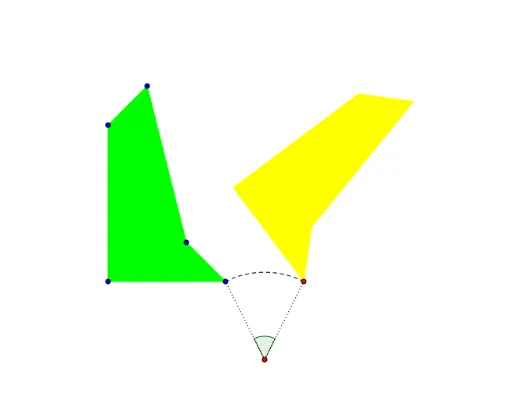
This GeoGebra example demonstrates the geometric transformation of rotating plane figures around a point, visually showing the positional and shape relationships before and after rotation. Core mathematical concepts include rotation (Rotate), angle (Angle), polygon (Polygon), and circle (Circle) construction, along with the correspondence of points, edges, and arcs after rotation. Construction highlights: using commands like Polygon, Circle, Point, CircleArc, Segment, Angle, and Rotate to build base shapes, then applying Rotate to the polygon and its vertices/edges to generate rotated copies (e.g., A', B', poly1'), while retaining originals for comparison. Suitable for middle/high school geometry lessons or math enthusiasts exploring rotation properties, and can be extended to understand transformations in function graphs (e.g., exponential and tangent functions).
GeoGebra Commands & Parameters
Polygon(A, B, C, D, E) → poly1, a, b, c, d, eCircle(F, C) → fPoint(f) → GCircleArc(F, G, C) → gSegment(F, C) → hSegment(F, G) → iAngle(G, F, C) → αRotate(A, (-α), F) → A'Rotate(B, (-α), F) → B'Rotate(C, (-α), F) → C'Rotate(D, (-α), F) → D'Rotate(E, (-α), F) → E'Polygon(A', B', C', D', E') → poly1', a', b', c', d', e'
AI Drawing Prompt Reference
Draw a pentagon and a circle with the circle's center at one vertex of the pentagon. Rotate the pentagon around this center by a certain angle to show the before and after positions. Connect the center to the rotated vertices with arcs and lines, clearly displaying the rotation angle and the relationships between corresponding points and edges.
The prompt above was compiled from the original drawing commands and is for reference only.