
Exploring Pythagoras' Theorem: A Dynamic Geometry Demonstration
Loading the math board and drawing, please wait…
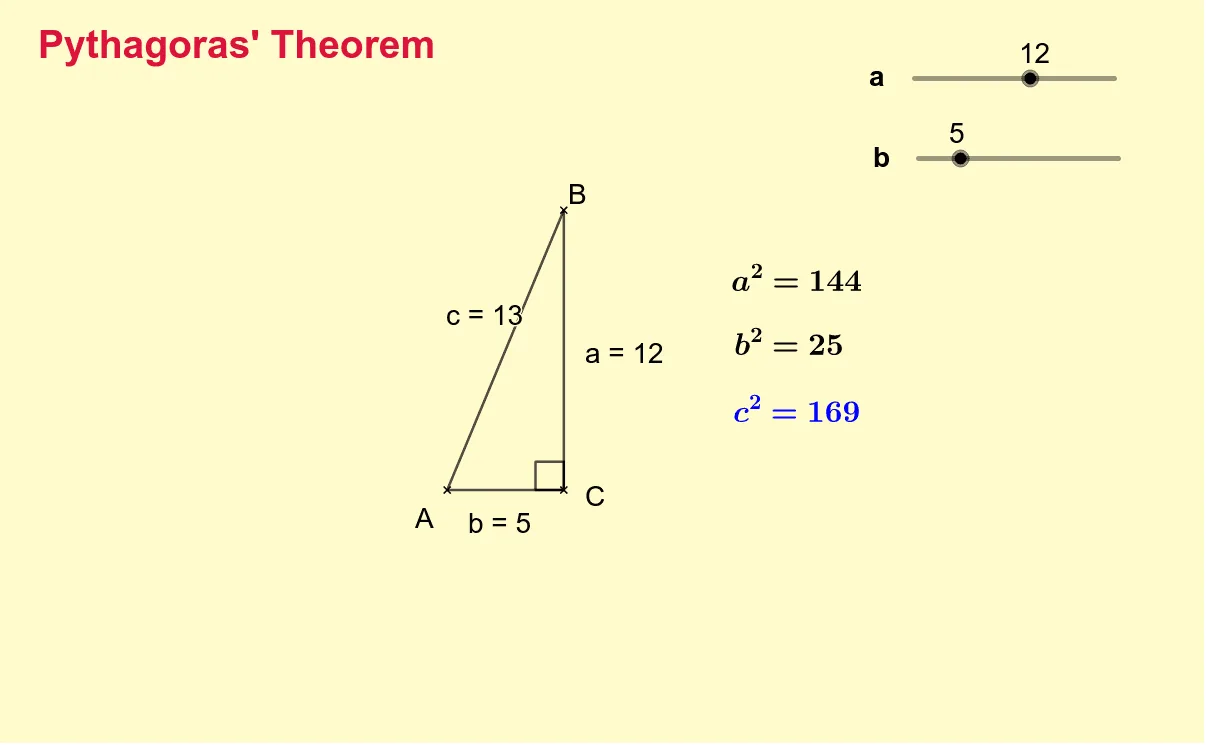
① This interactive GeoGebra example dynamically demonstrates the Pythagorean theorem, showing that in a right triangle, the square of the hypotenuse equals the sum of the squares of the other two sides. ② Core mathematical concepts include the Pythagorean theorem, right triangles, side lengths, areas, and algebraic relationships. ③ Construction highlights: using GeoGebra commands Segment and Angle to build the right triangle, with objects C, a_1, b_1, A, B, c, b, a, α defining vertices and sides; text objects (text1 to text6) display numerical comparisons of squared side lengths, and auxiliary shapes like rectangles or cubes may visualize area relationships. ④ Suitable for middle school to high school students, this example supports exploratory learning of geometric theorems and serves as an effective classroom demonstration tool for teachers to illustrate the algebraic and geometric meaning of the Pythagorean theorem.
GeoGebra Commands & Parameters
Segment(A, B) → cSegment(A, C) → bSegment(C, B) → aAngle(B, C, A) → α
AI Drawing Prompt Reference
Draw a right triangle with the right angle vertex at the top and the other two vertices at the bottom left and bottom right. Connect the three vertices with line segments to form the triangle. Mark the right angle with a small square symbol at the top vertex. Use different colors or line styles for the three sides and label their lengths. Add text near the triangle showing the Pythagorean relationship, such as the sum of the squares of the two legs equals the square of the hypotenuse. Keep the layout clear for educational demonstration.
The prompt above was compiled from the original drawing commands and is for reference only.