
Exploring Polygon Rotation Around a Point
Loading the math board and drawing, please wait…
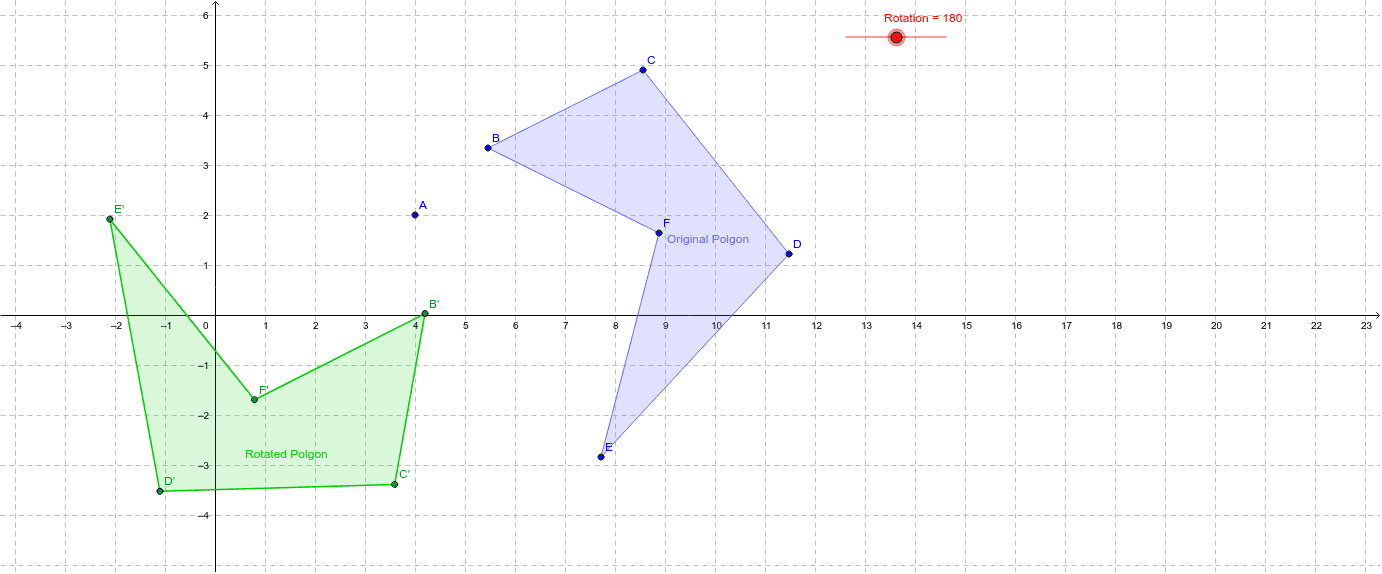
This GeoGebra applet demonstrates rotating an arbitrary polygon around a specified center point, showing the position relationship between the original and rotated figures. The hexagon ABCDEF is constructed using the Polygon command, then rotated by a specified angle using the Rotate command to create the corresponding polygon and vertices. Key mathematical concepts include the properties of rotational transformation, the meaning of rotation angle, and the effect of rotating a figure about a fixed point. Construction highlights: the Polygon command creates the base polygon, the Rotate command performs the rotation transformation, and a slider controls the rotation angle parameter for dynamic exploration. This applet is ideal for secondary school geometry teaching, introduction to rotational symmetry, and demonstrating the connection between trigonometry and geometric transformations.
GeoGebra Commands & Parameters
Polygon(B, C, D, E, F) → poly1, b, c, d, e, fRotate(B, Rotation, A) → B'Rotate(C, Rotation, A) → C'Rotate(D, Rotation, A) → D'Rotate(E, Rotation, A) → E'Rotate(F, Rotation, A) → F'Polygon(B', C', D', E', F') → poly1', b', c', d', e', f'
AI Drawing Prompt Reference
Draw a hexagon ABCDEF and rotate it around point A using a slider to control the rotation angle. First, create the hexagon using the polygon command, then rotate each vertex to form a new hexagon A'B'C'D'E'F'.
The prompt above was compiled from the original drawing commands and is for reference only.