
Exploring Line Reflections in the Coordinate Plane
Loading the math board and drawing, please wait…
In collections
Exploring Line Reflections in the Coordinate Plane
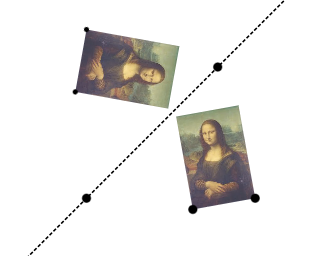
This example demonstrates geometric transformations involving line reflections in the coordinate plane. Key mathematical concepts include reflection, coordinate geometry, and linear functions. Construction involves using GeoGebra commands like Vector, Translate, Rotate, Mirror, and other objects. Suitable for middle school students learning geometric transformations or for educational tools in mathematics.
GeoGebra Commands & Parameters
Vector(D, E) → uTranslate(pic1, u) → pic1'Translate(B, u) → B'_{4}Translate(C, u) → C'_{4}Vector(B, B'_{4}) → vRotate(C, δ, A) → C'_1CircleArc(A, C'_1, C) → cCircleArc(A, C, C'_1) → dCircle(A, C) → eLine(F, G) → fMirror(pic1, f) → pic1'_2Mirror(B, f) → B'Mirror(C, f) → C'Dilate(pic1, k, A) → pic1'_3Dilate(B, k, A) → B'_3Dilate(C, k, A) → C'_3Rotate(B, δ, A) → B'_1Rotate(pic1, δ, A) → pic1'_1Circle(A, C) → pCircleArc(A, C'_1, C) → rTextfield(δ) → InputBox1Textfield(k) → InputBox2Intersect(q, eq1) → H
AI Drawing Prompt Reference
Illustrate geometric transformations involving line reflections in the coordinate plane, including a line segment's reflection, translation, and rotation. First, draw a line segment and determine its mirror image, then generate multiple related shapes through rotation and translation, and finally draw arcs and circles to emphasize reflection and transformation relationships, adding text boxes for inputting angles and scale factors.
The prompt above was compiled from the original drawing commands and is for reference only.