
Exploring Line Reflections in the Coordinate Plane by Tim Brzezinski (3)
Loading the math board and drawing, please wait…
In collections
Exploring Line Reflections in the Coordinate Plane
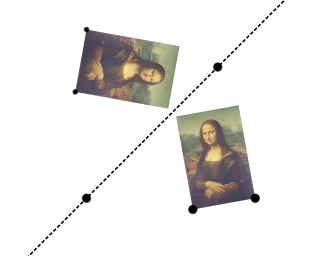
This example demonstrates the geometric transformation of line reflections in the coordinate plane. Key mathematical concepts include reflection transformations, coordinate geometry, and graphical symmetry. Construction involves using GeoGebra commands like Vector, Translate, Rotate, Mirror with objects δ, C, A, B to create reflection figures. Suitable for middle school students learning geometric transformations or for mathematical teaching aids.
GeoGebra Commands & Parameters
Vector(D, E) → uTranslate(pic1, u) → pic1'Translate(B, u) → B'_{4}Translate(C, u) → C'_{4}Vector(B, B'_{4}) → vRotate(C, δ, A) → C'_1CircleArc(A, C'_1, C) → cCircleArc(A, C, C'_1) → dCircle(A, C) → eLine(F, G) → fMirror(pic1, f) → pic1'_2Mirror(B, f) → B'Mirror(C, f) → C'Dilate(pic1, k, A) → pic1'_3Dilate(B, k, A) → B'_3Dilate(C, k, A) → C'_3Rotate(B, δ, A) → B'_1Rotate(pic1, δ, A) → pic1'_1Circle(A, C) → pCircleArc(A, C'_1, C) → rTextfield(δ) → InputBox1Textfield(k) → InputBox2Intersect(q, eq1) → H
AI Drawing Prompt Reference
Demonstrate line reflections in the coordinate plane by drawing two line segments and determining their reflection axis. Use vector operations and translations to create reflected figures, then apply rotations and mirror operations to generate symmetric shapes, and finally combine arcs and text annotations to complete the display, showcasing reflection transformations, coordinate geometry, and graphical symmetry.
The prompt above was compiled from the original drawing commands and is for reference only.