
Exploring Distributions with Histograms and Box Plots
Loading the math board and drawing, please wait…
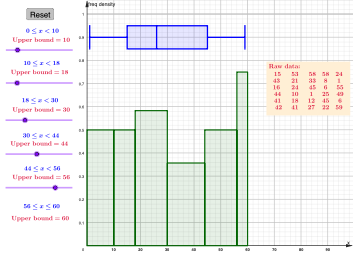
This example demonstrates how to visualize the distribution of randomly generated data using both a histogram and a box plot, and how to compare spread and central tendency at a glance. It focuses on core probability and statistics ideas: frequency distributions (histograms) and descriptive summaries via the five-number summary (Min, Q1, Median, Q3, Max). The construction uses GeoGebra commands such as Random to generate sample data, CountIf to count observations in each bin, and Sum to accumulate totals; Histogram then renders the frequency plot. In parallel, BoxPlot creates the box-and-whisker display, while Median, Q1, Q3, Min, and Max compute the key statistics that position the box and whiskers. Text objects annotate these values, and interactive controls (e.g., a button and related parameters) allow the user to resample and observe how the plots update. Suitable for high school advanced statistics and early undergraduate coursework, as well as classroom demonstrations and student explorations.
GeoGebra Commands & Parameters
Random(1, 60, 30) → l1, {15, 53, 58, 58, 24, 43, 21, 33, 8, 1, 16, 24, 45, 6, 55, 44, 10, 1, 25, 49, 41, 18, 12, 45, 6, 42, 41, 27, 22, 59}CountIf(0 ≤ x < a, l1) → fr_1CountIf(a ≤ x < b, l1) → fr_2CountIf(b ≤ x < c, l1) → fr_3CountIf(c ≤ x < d, l1) → fr_4CountIf(d ≤ x < e, l1) → fr_5CountIf(e ≤ x ≤ 60, l1) → fr_6Sum({fr_1, fr_2, fr_3, fr_4, fr_5, fr_6}) → sumHistogram({0, a, b, c, d, e, 60}, l1, true, 1) → a_{1}BoxPlot(0.9, 0.05, l1, true) → iMedian(l1) → Q_2Q1(l1) → Q_1Q3(l1) → Q_3Min(l1) → lvMax(l1) → hv
AI Drawing Prompt Reference
Generate a set of random data and draw a histogram and a box plot to display the distribution of the data, with text annotations for the minimum, first quartile, median, third quartile, and maximum values. Add a slider to control the generation of data and the range of the histogram, so that the user can observe how the histogram and box plot update when the data changes.
The prompt above was compiled from the original drawing commands and is for reference only.