
Exploring Dilations: Beginner Exercise 19
Loading the math board and drawing, please wait…
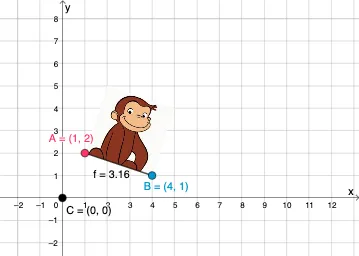
①This example demonstrates a beginner-level exploration of dilation (scaling) transformations in GeoGebra, focusing on how shapes change when scaled about a center point. ②The core mathematical concept is dilation, a geometric transformation that enlarges or reduces a figure by a scale factor relative to a fixed center, preserving shape and proportionality, and relating to similarity and geometric transformations. ③Construction details: from the summary, the Segment command is used to create segments, involving objects A, B, pic1, f, and C—pic1 may be an imported image, f could be a function or transformation, and C likely serves as the dilation center or a scaled point; the exercise likely uses sliders or input to adjust the scale factor dynamically. ④This is suitable for middle or high school students learning similarity and transformations, or as a basic GeoGebra exercise to visualize dilation interactively and understand its mathematical properties.
GeoGebra Commands & Parameters
Segment(A, B) → f
AI Drawing Prompt Reference
Create a geometric exercise for exploring dilation transformations. Start by placing a fixed center point on the canvas, then draw a segment between two endpoints as the original shape. Using this center, apply a scale factor (adjustable via a slider or input) to produce a new segment that is enlarged or reduced proportionally. The new segment should maintain the same direction as the original, with its endpoints lying on the same lines through the center. Clearly label the original segment, the scaled segment, and the center point. The layout should be clean and focused on showing how the shape changes with the scale factor.
The prompt above was compiled from the original drawing commands and is for reference only.