
Exploring 30-60-90 Triangle Relationships
Loading the math board and drawing, please wait…
In collections
GA Chapter 8: Right Triangles and Trigonometry
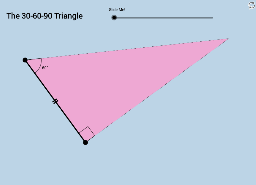
This example demonstrates the side length relationships in a 30-60-90 triangle without words or numerical data, allowing students to discover the pattern visually. Key math concepts include triangle similarity, side ratios, and geometric transformations. Construction involves commands like Rotate, Angle, Segment, Ray, OrthogonalLine, Intersect, Midpoint, Dilate, Vector, and Translate, utilizing objects such as angles, segments, and vectors. Suitable for high school mathematics education to help students understand and verify the properties of special triangles.
GeoGebra Commands & Parameters
Rotate(A, 60°, B) → A'Angle(A, B, A') → αSegment(A, B) → aRay(B, A') → bOrthogonalLine(A, a) → cRay(B, A') → dIntersect(c, d) → CAngle(C, A, B) → βSegment(B, C) → eSegment(C, A) → fMidpoint(e) → DDilate(A, If[0 < g ≤ 1, 1 - g, 0], D) → A'_2Vector(A, A'_2) → uTranslate(A, u) → A'_1Translate(B, u) → B'Segment(A'_1, B') → a'Rotate(A'_1, If[0 < g ≤ 1, ((g * 60))°, 60°], A'_2) → ERotate(B', If[0 < g ≤ 1, ((g * 60))°, 60°], A'_2) → B''Segment(E, B'') → a''Polygon(B, A, C) → poly1, c_1, b_1, a_1Dilate(A, If[1 < g ≤ 2, 2 - g, 0], C) → A'_3Vector(A, A'_3) → vTranslate(A, v) → A'_4Translate(B, v) → B'_1Segment(A'_4, B'_1) → a'_1Rotate(A'_4, If[1 < g ≤ 2, ((g * 30))°, 30°], A'_3) → FRotate(B'_1, If[1 < g ≤ 2, ((g * 30))°, 30°], A'_3) → GRotate(A'_4, If[1 < g ≤ 2, (((g - 1) * 30))°, 30°], A'_3) → HRotate(B'_1, If[1 < g ≤ 2, (((g - 1) * 30))°, 30°], A'_3) → IRotate(A'_4, If[1 < g ≤ 2, (((g - 1) * 60))°, 60°], A'_3) → JRotate(B'_1, If[1 < g ≤ 2, (((g - 1) * 60))°, 60°], A'_3) → KSegment(J, K) → i
AI Drawing Prompt Reference
Draw a 30-60-90 triangle. Start with a horizontal base segment. Rotate its right endpoint 60 degrees counterclockwise around the left endpoint to create a ray. From the left endpoint, draw a perpendicular line to the base; intersect this line with the ray to get the third vertex. Connect the three vertices to form the triangle. Inside the triangle, from the midpoint of the base, create an adjustable vector pointing toward the opposite vertex. Translate the base along this vector to get a parallel segment, and rotate this segment around the midpoint to show angle changes. Also, from the opposite vertex, create another adjustable vector toward the base, translate the base, and rotate multiple segments to display side length ratios at different angles. Use sliders to control the rotation angles, visually demonstrating the proportional relationships among the short leg, long leg, and hypotenuse in a 30-60-90 triangle.
The prompt above was compiled from the original drawing commands and is for reference only.