
Exercise 5: Random Quadrilateral
Loading the math board and drawing, please wait…
In collections
LINEAR FUNCTIONS
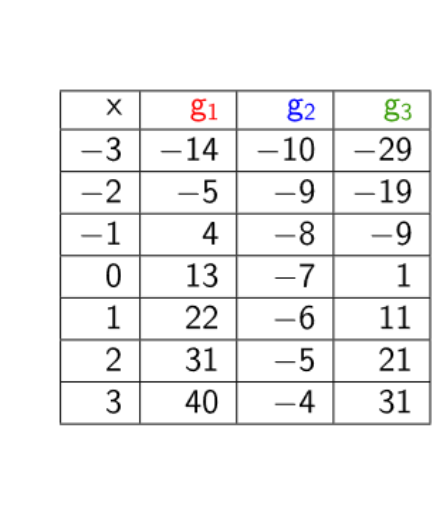
This example demonstrates a randomly generated quadrilateral. It involves geometric construction with random objects and table text. Using GeoGebra commands like Random and TableText, it dynamically shows the changes in the quadrilateral. Suitable for middle school and above students to learn geometric construction and random variables.
GeoGebra Commands & Parameters
Random(-10, 10) → aRandom(-15, 15) → a_1Random(-10, 10) → bRandom(-15, 15) → b_1Random(-10, 10) → cRandom(-15, 15) → c_1TableText({{A_1, B_1, C_1, D_1}, {-3, g_1(-3), g_2(-3), g_3(-3)}, {-2, g_1(-2), g_2(-2), g_3(-2)}, {-1, g_1(-1), g_2(-1), g_3(-1)}, {0, g_1(0), g_2(0), g_3(0)}, {1, g_1(1), g_2(1), g_3(1)}, {2, g_1(2), g_2(2), g_3(2)}, {3, g_1(3), g_2(3), g_3(3)}}, "|_r") → text1
AI Drawing Prompt Reference
Draw a randomly generated quadrilateral with four vertices whose x-coordinates are random numbers between -10 and 10, and y-coordinates between -15 and 15. Next to the shape, create a table with rows for integer x-values from -3 to 3, and columns showing the values of three different functions at those x-points, with vertical lines separating columns. The whole scene shows the quadrilateral and the function table together.
The prompt above was compiled from the original drawing commands and is for reference only.