
Exact quartic through 9 points GeoGebra example
Loading the math board and drawing, please wait…
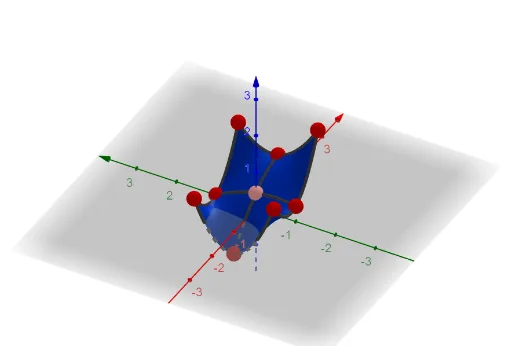
This example demonstrates constructing a quartic curve through nine given points using GeoGebra. The core mathematical concepts involve quartic curve equations, point-to-curve fitting, and coordinate geometry curve construction. Key construction steps include using commands like Point, Sequence, Transpose, Invert, and objects such as A, I, H, G, B, C, D, E, F. This example is suitable for high school students or college freshmen learning analytic geometry and curve fitting, useful for mathematical modeling and geometric construction practice.
GeoGebra Commands & Parameters
Point(Line[(0, 0, 0), (0, 0, 1)]) → APoint(Line[(0, 1, 0), (0, 1, 1)]) → IPoint(Line[(0, -1, 0), (0, -1, 1)]) → HPoint(Line[(-1, -1, 0), (-1, -1, 1)]) → GPoint(Line[(-1, 0, 0), (-1, 0, 1)]) → BPoint(Line[(1, 0, 0), (1, 0, 1)]) → CPoint(Line[(1, -1, 0), (1, -1, 1)]) → DPoint(Line[(1, 1, 0), (1, 1, 1)]) → EPoint(Line[(-1, 1, 0), (-1, 1, 1)]) → FSequence({z(Element[l1, i])}, i, 1, Length[l1]) → m2Sequence(1, i, 1, Length[l1]) → M_1Transpose(m1) → M_AInvert(M_A) → m4Sum(Sum[(m3 * {(x^(2) * y^(2)), (x^(2) * y), (x * y^(2)), x^(2), y^(2), (x * y), x, y, 1})]) → c
AI Drawing Prompt Reference
Draw a quartic curve passing through nine points. These points are located on the coordinate axes, forming a grid. The construction order is to first draw these points, then perform transformations and summation to generate the curve.
The prompt above was compiled from the original drawing commands and is for reference only.