
Exact Area Calculation Example
Loading the math board and drawing, please wait…
In collections
Calculating areas as an approach to the notions of limit and
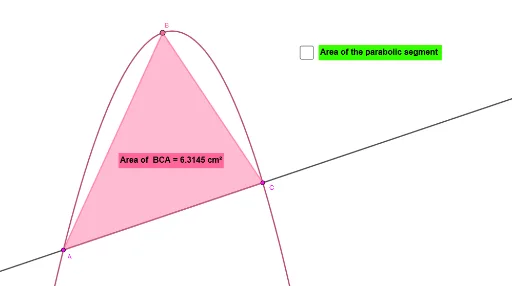
This example demonstrates how to construct and calculate the exact area of specific shapes (like polygons or trapezoids) using GeoGebra. It involves core mathematical concepts such as geometric construction, coordinate geometry, and area formulas for polygons. Key construction steps include using commands like Line, Intersect, Point, and Polygon. Suitable for high school mathematics teaching or student exploration of geometric problems, especially those involving complex area calculations.
GeoGebra Commands & Parameters
Line(p, q) → fIntersect(c, f, 1) → APoint(c) → BIntersect(c, f, 2) → CPolygon(B, C, A) → t1, a, b, c_1
AI Drawing Prompt Reference
Draw a triangle using points B, C, and A. First, draw a line f through points p and q. Then, mark points A and B as the intersections of circle c and line f. Next, find point C as the other intersection of circle c and line f. Finally, create a triangle t1 with points B, C, and A.
The prompt above was compiled from the original drawing commands and is for reference only.