
Designs of Students Aged 13-14
Loading the math board and drawing, please wait…
In collections
Calculating areas as an approach to the notions of limit and
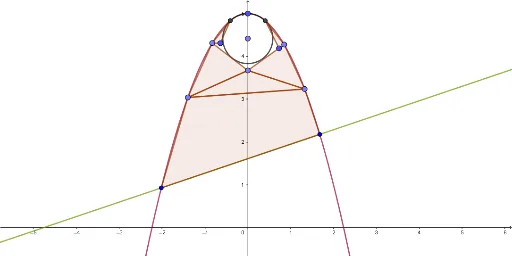
This example demonstrates how students can use GeoGebra to create geometric shapes and function graphs. The core mathematical concepts involved include difference and slope, logic, sine function, exponential functions, and bar graphs. The construction highlights the use of GeoGebra commands/objects such as Line, Intersect, Point, Circle, and Polygon. It is suitable for middle school students aged 13-14 learning geometric constructions and function graphing.
GeoGebra Commands & Parameters
Line(p, q) → fIntersect(c, f, 1) → AIntersect(c, f, 2) → CPoint(yAxis) → BCircle(B, D) → dIntersect(c, d, 1) → EIntersect(c, d, 1) → FPoint(c) → GPolygon(E, G, H) → poligonoa1, h, e, gIntersect(c, d, 2) → IPoint(c) → JPolygon(I, J, K) → poligonoa2, k, i, jPoint(c) → LPoint(yAxis) → MPolygon(G, L, M) → poligonoa3, m, g_1, lPoint(c) → NPolygon(M, N, J) → poligonoa4, j_1, m_1, nPolygon(L, N, M) → poligonoa5, m_2, l_1, n_1Polygon(L, A, C, N) → poligonoa6, l_2, a, c_1, n_2
AI Drawing Prompt Reference
Draw a complex geometric pattern composed of multiple shapes. Start by drawing a line, then find two intersection points between a circle and the line. Take a point on the y-axis as the center to draw a circle and find its two intersection points with the line. Use these points to draw several triangles and quadrilaterals, forming a complex geometric shape.
The prompt above was compiled from the original drawing commands and is for reference only.