
Master's Degree Student Designs
Loading the math board and drawing, please wait…
In collections
Calculating areas as an approach to the notions of limit and
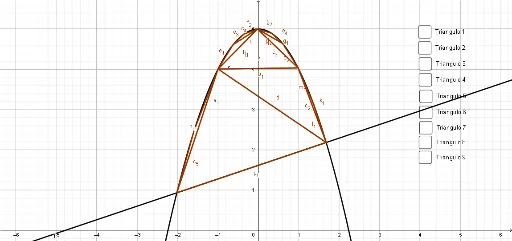
This example demonstrates the process of constructing complex geometric figures using GeoGebra. It involves core mathematical concepts such as the unit circle, logical reasoning, exponential functions, histograms, etc. Key construction elements include commands and objects like Intersect (intersection), Segment (line segment), LineBisector (angle bisector), Polygon (polygon), and PointIn (point inside object). Suitable for university mathematics, geometric design education, and learning purposes.
GeoGebra Commands & Parameters
Intersect(c, f, 1) → AIntersect(c, f, 2) → BSegment(A, B) → gLineBisector(g) → hIntersect(c, h, 2) → CPolygon(C, A, B) → polígono1, b, c_1, aLineBisector(a) → iIntersect(c, i, 1) → DPolygon(C, D, B) → polígono2, b_1, c_2, dLineBisector(b_1) → jIntersect(c, j, 2) → EPolygon(C, E, D) → polígono3, d_1, c_3, eLineBisector(d_1) → kLineBisector(c_3) → lIntersect(c, k, 2) → FPolygon(C, E, F) → polígono4, f_1, c_4, e_1Intersect(c, l, 2) → GPolygon(E, G, D) → polígono5, d_2, e_2, g_1LineBisector(b) → mLineBisector(c_4) → nLineBisector(d_2) → pIntersect(c, m, 1) → HIntersect(c, n, 1) → IIntersect(c, p, 2) → JPolygon(F, E, I) → polígono6, i_1, f_2, e_3Polygon(E, G, J) → polígono7, j_1, e_4, g_2Polygon(A, H, C) → polígono8, c_5, a_1, h_1LineBisector(c_2) → qIntersect(c, q, 2) → KIntersect(c, c_3, 1) → LIntersect(c, f, 2) → MPolygon(L, K, M) → polígono9, m_1, l_1, k_1PointIn(polígono1) → Puntopolígono1PointIn(polígono2) → Puntopolígono2PointIn(polígono3) → Puntopolígono3PointIn(polígono4) → Puntopolígono4PointIn(polígono5) → Puntopolígono5PointIn(polígono7) → Puntopolígono7PointIn(polígono6) → Puntopolígono6PointIn(polígono9) → Puntopolígono9PointIn(polígono8) → Puntopolígono8
AI Drawing Prompt Reference
Draw a unit circle and create two points on it. Connect these points to form a line segment. Draw the perpendicular bisector of this segment and find its other intersection with the circle. Use these three points to form a polygon. Repeat this process with the perpendicular bisector to create additional points and polygons on the circle, forming a nested structure of polygons, and mark a point inside each polygon.
The prompt above was compiled from the original drawing commands and is for reference only.