
Euler Line Surprise: Dynamic Scalene Triangle Demonstration
Loading the math board and drawing, please wait…
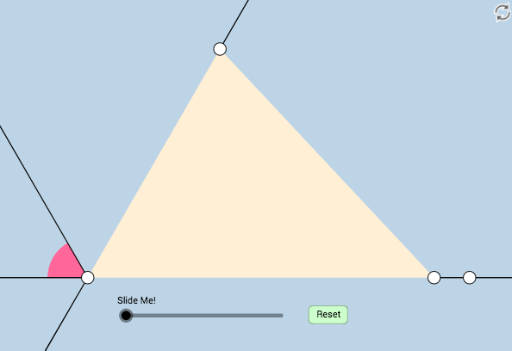
This example dynamically illustrates the Euler line of a special scalene triangle, revealing fascinating geometric properties. It involves core concepts like the Euler line, orthocenter, circumcenter, centroid, and nine-point circle. Construction uses commands such as Line, Rotate, Angle, Ray, Point, Mirror, Segment, Circle, Intersect, CircleSector, Polygon, Midpoint, OrthogonalLine, Dilate, Vector, and Translate in GeoGebra. Ideal for high school students and geometry enthusiasts exploring dynamic geometry and Euler line properties.
GeoGebra Commands & Parameters
Line(A, B) → fRotate(B, π / 3, A) → B'Angle(B, A, B') → αRotate(B', π / 3, A) → B''Angle(B', A, B'') → βRay(A, B'') → gRay(A, B') → hPoint(h) → CMirror(B, A) → B'_1Ray(A, B) → jPoint(j) → DSegment(C, D) → iRay(A, B'_1) → kSegment(A, D) → lSegment(A, C) → mCircle(A, (0.15 * Min[l, m])) → cIntersect(c, k, 1) → EIntersect(c, g) → F,CircleSector(A, F, E) → dRotate(d, If[0 < a ≤ 1, ((-a) * π / 3), ((-π)) / 3], A) → d'Rotate(d', If[2 < a ≤ 3, ((-(a - 2)) * π / 3), ((-π)) / 3], A) → d''Polygon(A, C, D) → poly1, d_1, a_1, c_1Midpoint(A, D) → GMidpoint(A, C) → ILine(A, C) → nOrthogonalLine(D, n) → pIntersect(n, p) → JLine(A, D) → qOrthogonalLine(C, q) → rIntersect(r, q) → HDilate(A, If[3 < a ≤ 4, 4 - a, 0], G) → A'Dilate(A, If[3 < a ≤ 4, 4 - a, 0], I) → A'_1Segment(A, A') → sSegment(A, A'_1) → tRotate(A, If[4 < a ≤ 5, ((-(a - 4)) * π), (-π)], G) → A'_2Rotate(A', If[4 < a ≤ 5, ((-(a - 4)) * π), (-π)], G) → A''Segment(A'_2, A'') → s'Rotate(A, If[4 < a ≤ 5, ((-(a - 4)) * π), (-π)], I) → A'_3Rotate(A'_1, If[4 < a ≤ 5, ((-(a - 4)) * π), (-π)], I) → KSegment(A'_3, K) → t'Line(C, G) → bLine(D, I) → eIntersect(b, e) → LIntersect(p, r) → MDilate(D, If[5 < a ≤ 6, 6 - a, 0], L) → D'Dilate(C, If[5 < a ≤ 6, 6 - a, 0], L) → C'Segment(C, C') → f_1Segment(D, D') → g_1Dilate(L, If[6 < a ≤ 7, 7 - a, 0], G) → L'Dilate(L, If[6 < a ≤ 7, 7 - a, 0], I) → L'_1Segment(L, L'_1) → h_1Segment(L, L') → i_1Dilate(C, If[7 < a ≤ 8, 8 - a, 0], M) → C'_1Dilate(D, If[7 < a ≤ 8, 8 - a, 0], M) → D'_1Segment(C, C'_1) → j_1Segment(D, D'_1) → k_1Angle(D, J, C) → γAngle(D, H, C) → δDilate(M, If[8 < a ≤ 9, 9 - a, 0], J) → M'Dilate(M, If[8 < a ≤ 9, 9 - a, 0], H) → M'_1Segment(M, M') → l_1Segment(M, M'_1) → m_1Line(A, C) → n_1Circle(C, 1) → e_1Intersect(e_1, n_1, 2) → NCircle(A, 1) → p_1Intersect(p_1, n_1) → O, PRay(C, N) → q_1Ray(A, O) → r_1Ray(A, D) → s_1Circle(D, 1) → t_1Intersect(t_1, s_1) → Q, RRay(D, R) → b_1Line(M, L) → f_2Intersect(n, f_2) → SIntersect(q, f_2) → TDilate(M, If[9 < a ≤ 10, 10 - a, 0], L) → M'_2Segment(M, M'_2) → g_2Polygon(A, T, S) → poly2, s_2, a_2, t_2Segment(S, C) → h_2Segment(T, D) → i_2Dilate(A, If[12 < a ≤ 13, 13 - a, 0], T) → A'_4Vector(A, A'_4) → uTranslate(d'', u) → d'''Rotate(d''', If[13 < a ≤ 14, (((a - 13) * 2) * π / 3), (2 * π / 3)], T) → c_2Dilate(T, If[14 < a ≤ 15, 15 - a, 0], S) → T'Vector(T, T') → vTranslate(c_2, v) → d_2Rotate(d_2, If[15 < a ≤ 16, (((a - 15) * 2) * π / 3), (2 * π / 3)], S) → e_2
AI Drawing Prompt Reference
Draw a dynamic scalene triangle and its Euler line. Include the orthocenter, circumcenter, centroid, and nine-point circle. Start by constructing the triangle, then rotate vertices to create rays and find the third vertex. Next, determine midpoints, perpendiculars, and intersections to draw the nine-point circle and Euler line. Finally, use a slider to dynamically adjust the triangle and observe the changes in the Euler line and key points.
The prompt above was compiled from the original drawing commands and is for reference only.