
Euclid: The Game – Level 16: Constructing Segments with Function Objects
Loading the math board and drawing, please wait…
In collections
Euclid: The Game
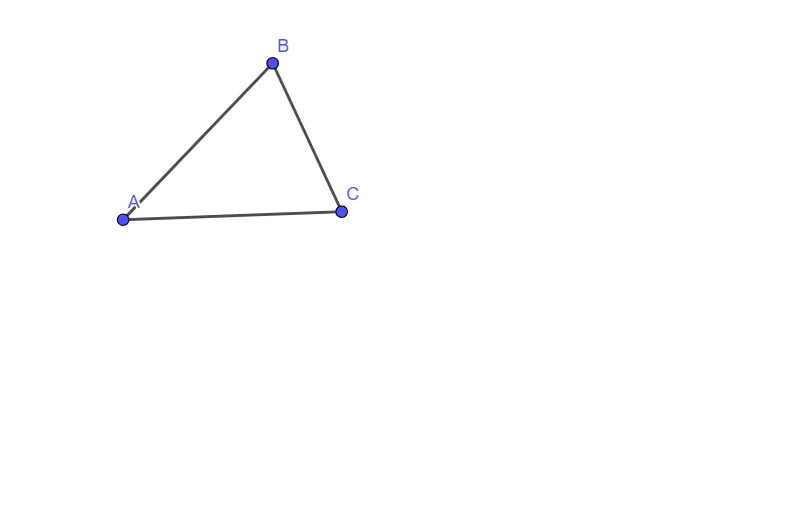
This example demonstrates how to build a geometric configuration by constructing and connecting key points using line segments, while simultaneously introducing function-related objects to enable a linked numeric–geometric interpretation. The key mathematical ideas include geometric construction (segment formation), relationships among points and segments, and the use of GeoGebra function/parameter objects (such as f, g, h) alongside geometric elements for subsequent calculation or validation. Construction-wise, the provided summary shows the primary use of the “Segment” command to create segment objects from endpoints A and B, and to incorporate additional objects like f, C, g, and h within the level’s setup. It is suitable for secondary school through early undergraduate learners, especially for lessons or practice on geometric constructions and understanding how function objects can be integrated into dynamic geometry software.
GeoGebra Commands & Parameters
Segment(A, B) → fSegment(B, C) → gSegment(C, A) → h
AI Drawing Prompt Reference
Place three points in the plane and connect them pairwise to form the three sides of a triangle. First draw a segment from the first point to the second point, then draw a segment from the second point to the third point, and finally draw a segment from the third point back to the first point so the boundary is complete. Include the corresponding function-related objects along with these segments to enable a linked numeric–geometric interpretation for later calculation or checking.
The prompt above was compiled from the original drawing commands and is for reference only.