
Estimating Sums of Fractions and Mixed Numbers on a Number Line
Loading the math board and drawing, please wait…
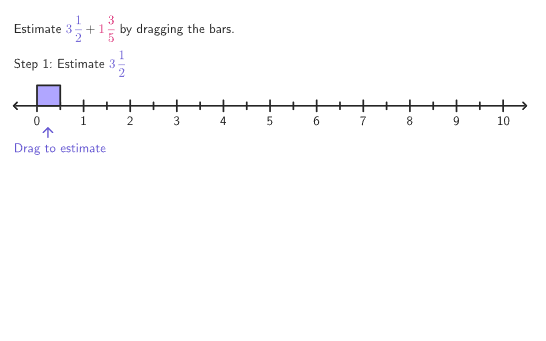
This example helps students estimate the sum of fractions and mixed numbers by adjusting bars on a number line. Students need to estimate the length of each bar separately to find an estimated total. The core math concepts involved include the addition of fractions and mixed numbers. Using GeoGebra commands such as Shuffle, PixelsToPoint, and horizontalTwoPointBox, students can visually understand how to make these estimations. Suitable for 4-5 grade students for exploration and learning.
GeoGebra Commands & Parameters
Shuffle({{1, 2}, {2, 1}, {1, 1}, {1, 2}, {3, 1}, {2, 3}, {1, 3}, {1, 1}, {2, 1}, {2, 2}}) → wholePairs, {{2, 1}, {3, 1}, {1, 3}, {2, 2}, {1, 1}, {1, 2}, {2, 3}, {1, 2}, {2, 1}, {1, 1}}Shuffle({{1 / 2, 3 / 4}, {1 / 2, 2 / 3}, {1 / 3, 1 / 2}, {1 / 4, 3 / 5}, {2 / 5, 1 / 3}, {2 / 3, 3 / 4}, {1 / 2, 3 / 5}, {2 / 5, 1 / 4}, {2 / 5, 1 / 5}, {1 / 3, 2 / 3}}) → fracPairs, {{0.5, 0.75}, {0.5, 0.6}, {0.3333333333333333, 0.5}, {0.4, 0.25}, {0.25, 0.6}, {0.5, 0.6666666666666666}, {0.4, 0.3333333333333333}, {0.6666666666666666, 0.75}, {0.4, 0.2}, {0.3333333333333333, 0.6666666666666666}}PixelsToPoint((xMin, yMin), (xMax, yMax), (PXwidth, PXheight), (20, 155)) → AnchorAhorizontalTwoPointBox((numB, y(Bar2a)), (numB, y(Bar2b))) → solnBar2horizontalTwoPointBox((numA, y(Bar1a)), (numA, y(Bar1b))) → solnBar1If((2 * countQuestion) + 9 < 45, (2 * countQuestion) + 1, 1) → startIndexmakeRegion(Bar1a, Bar1b) → bar1makeRegion(Bar2a, Bar2b) → bar2Polygon({(-10, -1), (-10, 5.5), (55, 5.5), (55, -1)}) → viewboxSegment(AnchorA, AnchorA2) → numberLine1Segment(AnchorB, AnchorB2) → numberLine2Segment(AnchorC, AnchorC2) → numberLine3Translate(bar1, AnchorB - AnchorA) → bar1TranslatedboxTool(x(Bar2b) - x(Bar2a), y(Bar2b) - y(Bar2a), (x(Bar1b), y(AnchorB))) → shadowBarboxTool(x(Bar2b) - x(Bar2a), y(Bar2b) - y(Bar2a), (x(Bar1b), y(AnchorB))) → shadowBarOutlinemakeRegion(Bar1a, Bar1b) → bar1DragIf(stage ≟ 1, {Vertex[bar1]}, {Vertex[bar2]}) → pulsingVerticesIf(stage ≟ 1, {101 / 255, 87 / 255, 210 / 255}, {218 / 255, 37 / 255, 112 / 255}) → pulseColorZip(Sequence[Segment[(x(AnchorA) + (B * unitWidth), (5 * (windowHeight) / PXheight) + y(A)), (x(AnchorA) + (B * unitWidth), (-5 * (windowHeight) / PXheight) + y(A))], B, 1, 10], A, Take[barAnchors, 1, stage]) → smallTicksZip(Sequence[Segment[(x(AnchorA) + unitWidth / 2 + (B * unitWidth), (8 * (windowHeight) / PXheight) + y(A)), (x(AnchorA) + unitWidth / 2 + (B * unitWidth), (-8 * (windowHeight) / PXheight) + y(A))], B, 0, 10], A, Take[barAnchors, 1, stage]) → bigTicksZip(Segment[solnPositions(B), (x(solnPositions(B)), y(barAnchors(2)))], B, {1, 3, 4}) → compareBarsmakeRegion(Bar2a, Bar2b) → bar2DragText("\text{Drag to estimate}", POnboardB + (0, (-5 * (windowHeight) / PXheight)), true, true, 0, 0) → onboardingTextBZip(Sequence[Text[("" * B), (x(A) + (unitWidth * (0.5 + B)), y(A) - (5 * (windowHeight) / PXheight)), true, true, 0, -1], B, 0, maxX], A, Take[barAnchors, 1, stage]) → numberLineTextmakeRegion(Bar1a, Bar1b) → bar1Outline
AI Drawing Prompt Reference
Draw a number line with several bar segments, each representing a fraction or mixed number. The length of each bar indicates its value. There are also some markers to show estimated totals. Students should drag the bars to estimate the sum and compare lengths. The graphic should clearly show the relationship between bars and the number line, and the estimation process.
The prompt above was compiled from the original drawing commands and is for reference only.