
Estimating Area of Irregular Shapes Using ICT
Loading the math board and drawing, please wait…
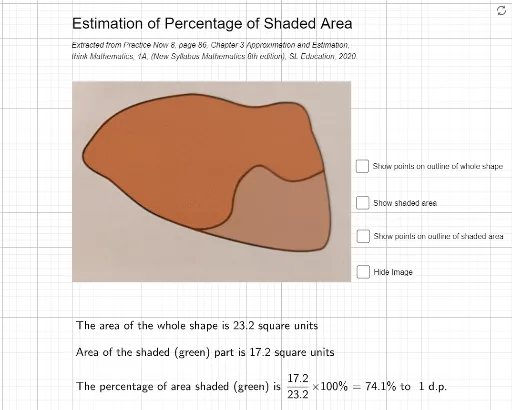
This activity demonstrates how an irregular closed figure with curved edges can be approximated as a polygon with many small straight segments, and its area estimated using GeoGebra's polygon tools. The core mathematical concepts include polygonal approximation, area estimation, and the underlying idea of numerical integration, with linear and trigonometric functions potentially used to model boundary curves. Construction details: from the summary, the Polygon command is used, with multiple points (A, B, C, D, E, F, G, H, I, J, K, L, M, N, O, P, Q, R, S, T, U, V, W, Z, A_1, B_1, C_1, D_1) and an image object pic1, connected to form polygon poly1, supplemented by auxiliary lines (c, d, e, f, g, h, i, j, k, l) to refine the boundary. This activity is suitable for secondary school mathematics teachers to use in classroom demonstrations, helping students understand approximation methods for area and appreciate the role of ICT in mathematics education.
GeoGebra Commands & Parameters
Polygon(C, D, M, N, O, P, Q, R, S, T, U, V, E, W, Z, A_1, B_1, C_1, D_1, F, G, H, I, J, K, L) → poly1, c, l, m, n, o, p, q, r, s, t, u, d, v, w, z_1, a_1, b_1, c_1, d_1, e, f, g, h, i, j, kPolygon(C, D, H_1, I_1, J_1, K_1, L_1, M_1, P, Q, R, S, E, T, U, V, W, Z, A_1, B_1, C_1, D_1, F, G, H, I, E_1, F_1, G_1) → poly2, c_2, j_1, k_1, l_1, m_1, n_1, p_1, q_1, p_2, q_2, r_1, d_2, s_1, t_1, u_1, v_1, w_1, z_2, f_2, g_2, h_2, i_2, e_1, f_1, g_1, h_1, i_1, a, b
AI Drawing Prompt Reference
Draw an irregular shape using multiple points (A, B, C, D, E, F, G, H, I, J, K, L, M, N, O, P, Q, R, S, T, U, V, W, Z, A_1, B_1, C_1, D_1) and auxiliary lines (c, d, e, f, g, h, i, j, k, l) to form two polygons, poly1 and poly2, to approximate the irregular boundary more accurately.
The prompt above was compiled from the original drawing commands and is for reference only.