
Estimate Side and Angles of Right Angled Triangles
Loading the math board and drawing, please wait…
In collections
Right Angled Triangles
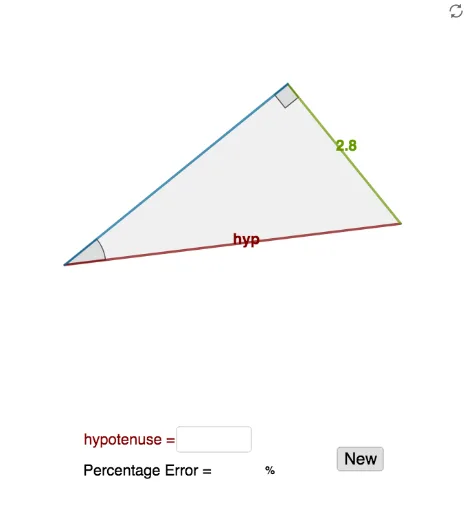
① This interactive example demonstrates how to estimate the side lengths and angles of right-angled triangles, allowing users to input values and receive immediate feedback. ② Core mathematical concepts include the Pythagorean theorem, trigonometric ratios (sine, cosine, tangent), and the relationships between sides and angles in right triangles. ③ Construction highlights: using GeoGebra commands such as Circle, Polygon, Angle, Midpoint, Textfield, and Shuffle, with objects like hyp, r, c, O, ang1, ang2, B, A, C, t1, b, c_1, a, α, β, D, E, opp, adj, hypt, and InputBoxes/buttons for dynamic input and validation. ④ Suitable for upper middle school or high school students to reinforce right-triangle properties, trigonometric calculations, and geometric intuition, and can serve as an interactive classroom exercise or self-study tool.
GeoGebra Commands & Parameters
Circle((0, 0), r) → cPolygon(C, A, B) → t1, b, c_1, aAngle(C, B, A) → αAngle(A, C, B) → βMidpoint(C, B) → DMidpoint(B, A) → ETextfield(emptyopp) → InputBox1Textfield(emptyadj) → InputBox2Textfield(emptyhyp) → InputBox3Textfield(emptyang) → InputBox4Shuffle(list1) → list2
AI Drawing Prompt Reference
Draw a right-angled triangle with labeled hypotenuse and legs, showing their lengths and angles. Use sliders to dynamically adjust the triangle's size, and display real-time calculations of leg lengths, hypotenuse length, and the measures of the two acute angles. Include an auxiliary circle inside the triangle, labeling the center, radius, and their relationships to the triangle.
The prompt above was compiled from the original drawing commands and is for reference only.