
Estimate 4.2: Geometric Exploration of Sphere and Rectangle Area Relations
Loading the math board and drawing, please wait…
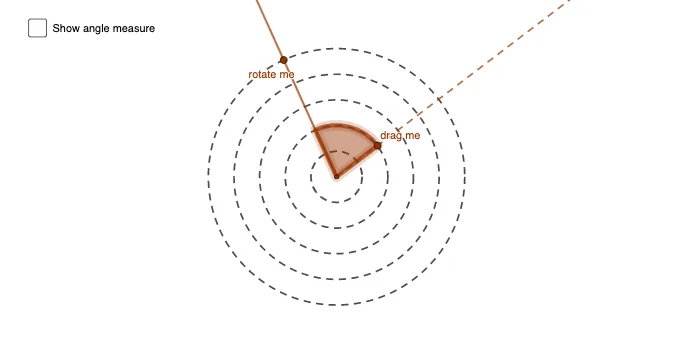
This GeoGebra example demonstrates the estimation of area relationships among a sphere, a rectangle, and circular sectors, incorporating the concept of expected value. The core mathematical concepts include congruence, area, sphere, rectangle, and expected value, aiming to intuitively understand the connection between area proportions and random expectations through geometric construction. The construction uses commands such as Circle, Point, Ray, Intersect, CircleSector, and Angle, with objects including A, c, d, e, f, g, B, h, E, G, I, K, C, i, D, k, α, and text1. It builds from basic geometric elements to complex area relations, suitable for high school or early college students, and serves as a visual aid for teachers to explain area estimation and expected value concepts in interdisciplinary lessons combining geometry and probability.
GeoGebra Commands & Parameters
Circle(A, 0.5) → cCircle(A, 1) → dCircle(A, 1.5) → eCircle(A, 2) → fCircle(A, 2.5) → gPoint(g) → BRay(A, B) → hIntersect(c, h, 1) → EIntersect(d, h, 1) → GIntersect(e, h, 1) → IIntersect(f, h, 1) → KPoint(g) → CRay(A, C) → iPoint(i) → DCircleSector(A, D, B) → kAngle(i, h) → α
AI Drawing Prompt Reference
Draw five concentric circles centered at a common point, with radii 0.5, 1, 1.5, 2, and 2.5. Pick two points on the outermost circle, and draw rays from the center through each point. One ray intersects the inner circles at four points. On the other ray, choose a point between the center and the outermost circle, and form a circular sector using the center, that point, and the point on the outermost circle. Mark the angle between the two rays with an arc. The figure shows concentric circles, rays, and a sector, illustrating area relations and expected value.
The prompt above was compiled from the original drawing commands and is for reference only.