
Cone Surface Area Formula via Net Exploration
Loading the math board and drawing, please wait…
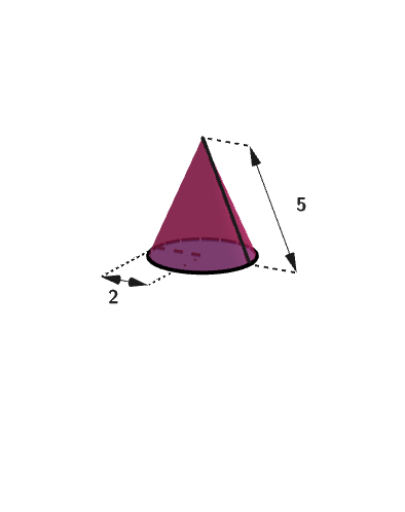
This example helps students explore how the lateral area and total surface area of a cone depend on its geometric measurements by “opening” the cone into its net. It focuses on the relationship between the cone’s lateral surface and a circular sector, linking the slant height (generatrix), the base radius, and the sector’s central angle to area formulas. The construction uses GeoGebra commands and objects such as Cone to model the 3D solid, Circle/Point/Segment to create the underlying circles and measurement geometry, Intersect and Distance to compute key lengths (e.g., radius and slant height), Angle/Rotate/OrthogonalLine to determine the orientation and sector angle for the net, and CircumcircleArc plus Surface/CurveCartesian to visualize the unfolded sector and associated surfaces. Text labels key variables (height, radius, sector parameters) and the setup includes Random/Shuffle/If to vary dimensions so learners can verify formulas across cases. Best suited for middle school (grades 6–8) solid geometry and measurement lessons focused on deriving and applying surface area formulas.
GeoGebra Commands & Parameters
Shuffle(Sequence[5]) → possibleRads, {1, 4, 3, 2, 5}If(countQuestion ≟ 0, 2, Element[possibleRads, Mod[countQuestion, Length[possibleRads]] + 1]) → r1Shuffle(KeepIf[1 ≤ sqrt(kk^(2) - r1^(2)) ≤ 5, kk, Sequence[7]]) → possibleHsl, {3, 5, 4}If(countQuestion ≟ 0, 5, possibleHsl(1)) → HslPoint(yAxis) → CAPoint(yAxis) → CBRay(A, (x(A), y(A), 40)) → hPoint(yAxis) → BPoint(Segment[(0, 0, 0.1), (0, 0, 4)]) → CDRandom(3, 8) → nRandCircle(CA, CB) → dSegment((1, 0, 0), (1, 0, 5)) → aConCircle(aCon, (0, 0, 0)) → cConIntersect(xAxis, aCon) → KBCone(KB, KA, 1) → bCon, dCon, eConIntersect(yAxis, xAxis) → KCSegment(KC, KA) → lConDistance(KB, KC) → rConAngle(KA, KC, KB) → αRotate(KA, (abs(tCil) * α), yAxis) → KAAOrthogonalLine(KAA, xOyPlane) → fConIntersect(fCon, xOyPlane) → KBBRotate(KC, bet / 2, fCon) → KCCRotate(KC, ((-bet)) / 2, fCon) → KCRCircumcircleArc(KCC, KC, KCR) → gConDistance(KAA, KBB) → hConDistance(KBB, KCC) → rcConSurface(((kCon - ((v * rcCon) * cos((u * bet / 2)))) * cos(ϕCon)) - (((1 - v) * hCon) * sin(ϕCon)), ((v * rcCon) * sin((u * bet / 2))), (((1 - v) * hCon) * cos(ϕCon)) + ((kCon - ((v * rcCon) * cos((u * bet / 2)))) * sin(ϕCon)), u, -1, 1, v, 0, 1) → jConCurveCartesian(((kCon - (rcCon * cos((u * bet / 2)))) * cos(ϕCon)), (rcCon * sin((u * bet / 2))), ((kCon - (rcCon * cos((u * bet / 2)))) * sin(ϕCon)), u, -1, 1) → mConSegment(KE, KF) → nConSegment(KD, KF) → pConCorner(5) → SizeGV1Vector((1; (pi / 2 * tCil2) + (pi / 6 * (1 - tCil2)); ((-pi)) / 2 + ((0.8 * pi / 2) * (1 - tCil2)))) → viewRotate(jCon, -90°) → jCon'Rotate(KE, -90°) → KE'Rotate(KF, -90°) → KF'Segment(KE', KF') → nCon'Rotate(KD, -90°) → KD'Rotate(KF, -90°) → KF'_{1}Segment(KD', KF'_{1}) → pCon'Rotate(cCon, -90°) → cCon'Rotate(mCon, -90°) → mCon'Rotate(dCon, -90°) → dCon'If(r1 / Hsl ≤ 1 / 2, 1, 2) → factorTranslate(KE', Vector[(0, -1 + (2 * tCil2), 0)]) → EP1Translate(KF', Vector[(0, -1 + (2 * tCil2), 0)]) → EP2Vector(Midpoint[EP1, EP2], EP1) → uVector(Midpoint[EP1, EP2], EP2) → vVector(Midpoint[EPr1, EPr2], EPr2) → wVector(Midpoint[EPr1, EPr2], EPr1) → aSegment((0, -1, 0), (0, 0)) → fSegment(EP1, KE') → gSegment(EP2, KF') → iSegment(EPr2, (0, -1, 0)) → jSegment(EPr1, (0, 0, 0)) → kText(r1, (0, 0), true, true) → labelRToMeasureText(Hsl, (0, 0), true, true) → labelLToMeasureVector(Corner[labelRToMeasure, 1], Corner[labelRToMeasure, 3]) → measureLabelRVector(Corner[labelLToMeasure, 1], Corner[labelLToMeasure, 3]) → measureLabelLText(r1, Midpoint[EPr1, EPr2] + ((-x(measureLabelR)), y(measureLabelR) / 2), true, true) → labelRText(Hsl, Midpoint[EP1, EP2] + (((-tCil2) * x(measureLabelL) / 4), (((2 * tCil2) - 1) * y(measureLabelL)), (y(measureLabelL) * (1 - tCil2))), true, true) → labelL
AI Drawing Prompt Reference
Draw an unfolded net of a cone, showing a sector and a circle. Include a 3D cone model whose lateral surface unfolds into a sector. The sector's radius equals the cone's slant height, and its arc length equals the base circle's circumference. Label the cone's height, base radius, and sector's central angle. Connect the cone's vertex to the base circle center to illustrate geometric relationships.
The prompt above was compiled from the original drawing commands and is for reference only.