
Equivalent Fractions Visualization by Austen Meek
Loading the math board and drawing, please wait…
In collections
Fraction worksheets
FRACTIONS
Fractions: Skills & Concepts
Fractions: Skills & Concepts
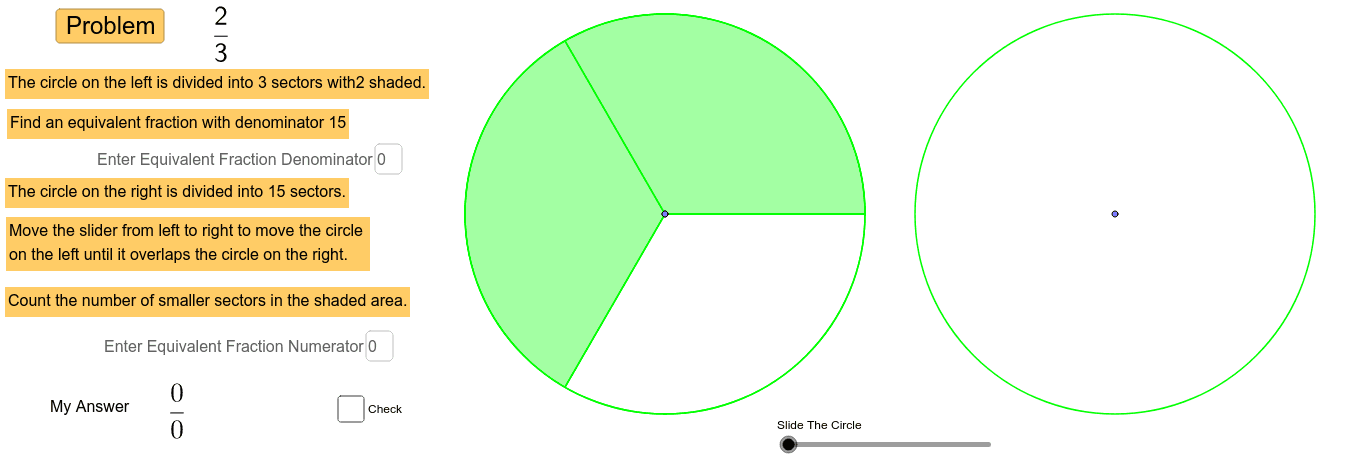
This example visually demonstrates the concept of equivalent fractions, helping students understand fraction equivalence. Key mathematical concepts include fractions. Using GeoGebra commands such as Random, GCD, Point, etc., students can dynamically explore the construction of equivalent fractions. Suitable for high-grade elementary and junior high school students for learning and practicing fraction concepts.
GeoGebra Commands & Parameters
Random(2, 12) → denom_1Random(1, denom_1 - 1) → numer_1GCD(numer_1, denom_1) → tPoint(xAxis) → BSegment(B, A) → aPoint(a) → CCircle(C, 4) → dSequence(m, m, 1, denom - 1, 1) → list3Sequence(Segment[C, C + ((4 * cos(α°)), (4 * sin(α°)))], α, 0, 360, 360 / denom) → list2Sector(d, 0, ((numer * 360) * ° / denom)) → eRandom(2, ceil(24 / denom)) → multSequence(Segment[A, A + ((4 * cos(α°)), (4 * sin(α°)))], α, 0, 360, 360 / denom_2) → list1Textfield(numer_2) → inputBox1Textfield(denom_2) → inputBox2Translate(d, Vector[B, (f, 0)]) → d'_1Vector(B, (f, 0)) → uTranslate(e, u) → e'Translate(list2, u) → list2'
AI Drawing Prompt Reference
Draw a circle and then divide it into several sectors to represent a fraction. Then, using rotation and scaling, draw another set of sectors to represent an equivalent fraction, showing the concept of equivalent fractions.
The prompt above was compiled from the original drawing commands and is for reference only.