
Equivalent Fractions Exploration
Loading the math board and drawing, please wait…
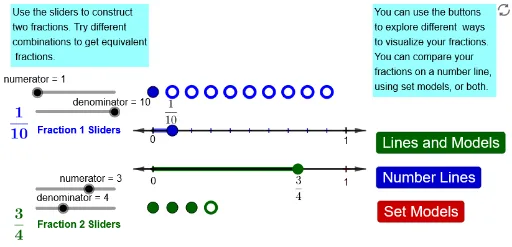
This example demonstrates how to visually understand the concept of equivalent fractions through the area division of rectangles. Core math concepts include fractions, geometric models, and area. It uses commands like Point, Vector, Sequence, Segment to create dynamic visualizations, showing the relationships between fractions. Suitable for middle school mathematics teaching, focusing on visualizing and grasping fraction concepts.
GeoGebra Commands & Parameters
Point(yAxis) → AVector(A, B) → uVector(B, A) → vPoint(v) → CPoint(v) → DPoint(yAxis) → A_{1}Vector(A_{1}, B_{1}) → u_{1}Vector(B_{1}, A_{1}) → v_{1}Point(v_{1}) → C_{1}Point(u_{1}) → D_{1}Sequence((1 + (i / n * 10), 1), i, 0, n) → ISegment(C, E) → fSegment(C_{1}, E_{1}) → f_{1}Sequence((i, 3), i, 1, m) → JSequence((m + i, 3), i, 1, n - m) → KSequence((i, -3), i, 1, m_1) → J_{1}Sequence((m_1 + i, -3), i, 1, n_1 - m_1) → K_{1}
AI Drawing Prompt Reference
Draw a rectangle and divide it into several equal parts with different colors. Then draw another rectangle of the same size below it and divide it into a different number of equal parts. Finally, use segments to connect corresponding parts of the two rectangles, demonstrating the equivalent fraction relationship when the number of divisions is different but the area of the parts is the same.
The prompt above was compiled from the original drawing commands and is for reference only.