
Equilateral Triangles Between Curves by Lenore Horner
Loading the math board and drawing, please wait…
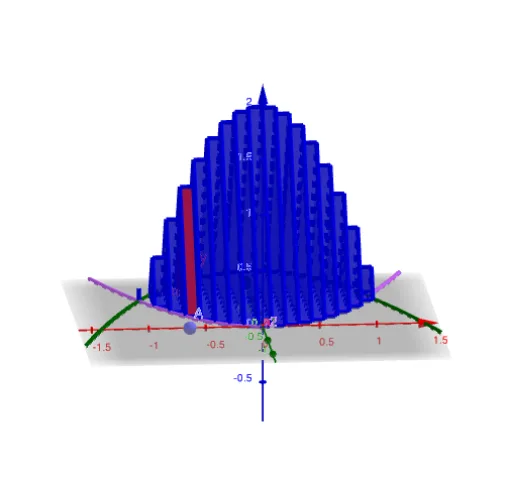
This example demonstrates constructing equilateral triangles between two curves. Key mathematical concepts include the properties of equilateral triangles, tangent lines, and trigonometric functions. Using GeoGebra commands such as Point, Polygon, and Segment, the triangles can be dynamically adjusted. Suitable for high school mathematics, particularly in coordinate geometry and calculus courses.
GeoGebra Commands & Parameters
Point(xAxis) → APolygon((x(A), y2(x(A)), 0), (x(A), y1(x(A)), 0), 3, xAxis) → poly1Segment((x(A), axle(x(A)) - radius(x(A))), (x(A), axle(x(A)) + radius(x(A)))) → baseTextfield(y1) → InputBox1Prism(poly1, dx) → a, B, edge3, edge4, edge5, edge6, C, D, face1, face2, face3, face4, edge1, edge2Textfield(y2) → InputBox2Textfield() → InputBox3Textfield() → InputBox4Sequence(Prism[Polygon[(t, y2(t), 0), (t, y1(t), 0), 3, xAxis], dx], t, L, R, dx) → slices
AI Drawing Prompt Reference
Draw two function curves in a coordinate system and dynamically construct equilateral triangles between them, demonstrating the properties of equilateral triangles, tangent lines, and trigonometric functions. Start by marking a point on the x-axis, then draw an equilateral triangle formed by the values of the two functions at that point. Next, draw a vertical segment as the base of the triangle. Finally, move the triangle along the x-axis and repeat the construction to form a series of equilateral triangles, showing dynamic adjustment.
The prompt above was compiled from the original drawing commands and is for reference only.