
Equations of Circles (Part 2): Visual Construction of Circle Relationships
Loading the math board and drawing, please wait…
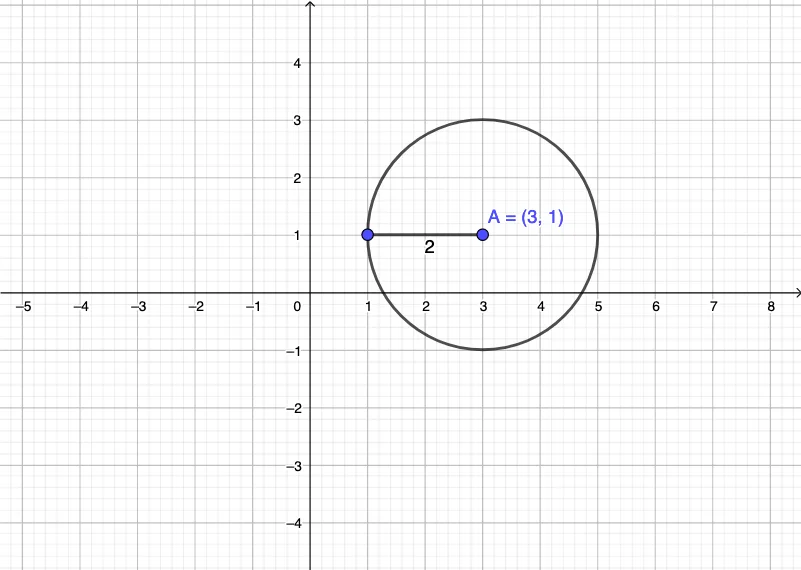
This GeoGebra example demonstrates how to construct and visualize circles corresponding to equations by building their geometric prerequisites. The key idea is that a circle is defined by all points at a fixed distance from a center, so the algebraic equation (in spirit) can be matched to the geometric locus on the screen. It focuses on core concepts such as the definition of a circle, the role of center and radius, and the coordinate-geometry viewpoint that links symbolic relationships with graphical curves. Construction highlights come directly from the provided summary: the commands Circle and Segment are used, together with objects A, B, c, and f. In practice, Segment supplies the length/geometry needed as a radius indicator (or otherwise determines the circle’s size), and Circle uses those computed/constructed elements to draw the resulting circle. Suitable for middle and high school learners studying coordinate geometry and for students who benefit from geometry construction to understand circle equations and their graphical meanings.
GeoGebra Commands & Parameters
Circle(A, B) → cSegment(B, A) → f
AI Drawing Prompt Reference
On a coordinate plane, create a visualization of a circle defined by two key points, A and B. Construct the circle determined by the relationship between A and B, showing the resulting curved locus. Also draw the line segment from B to A to serve as the geometric reference for the circle’s size (the radius information). Present it in a clear construction order: include the circle associated with A and B, and use the segment between B and A to indicate how the circle’s radius is determined.
The prompt above was compiled from the original drawing commands and is for reference only.