
Equation of a Line Through Midpoint
Loading the math board and drawing, please wait…
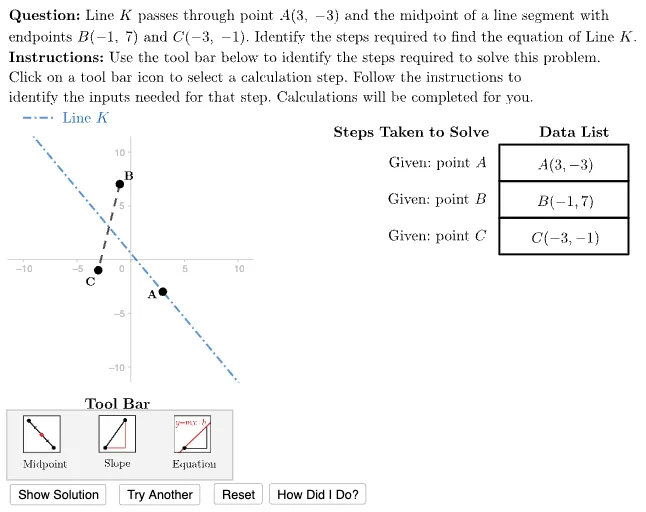
This example demonstrates constructing the equation of a line through a midpoint. Key mathematical concepts include line equations, midpoints, and vectors. Commands used include Polygon, Sequence, Element, UnitVector, etc. Suitable for middle school and above students learning coordinate geometry.
GeoGebra Commands & Parameters
Polygon({A, A + (12 * u), A + (12 * u) - vHeight, A - vHeight}) → ValueFrameTemplateLength(dTypes) → numStepsSequence((-10, -18) + ((3.5 * i) * u), i, 0, 6) → iconAnchorsSequence(Translate[ValueFrameTemplate, Vector[(-((vHeight * i)))]], i, 0, numSteps - 1) → ValueFramesSequence(Polygon[Element[iconAnchors, i], Element[iconAnchors, i + 1], 4], i, 1, 6, 2) → iconFramesPolygon({(left, bottom), (left, top), (right, top), (right, bottom)}) → viewboxElement(G3, caseNum) → A3Element(G4, caseNum) → A4Element(G5, caseNum) → A5Polygon({ToolAnchor - (2 * v) - u, ToolAnchor + (4.5 * v) - u, ToolAnchor + (4.5 * v) + (20 * u), ToolAnchor - (2 * v) + (20 * u)}) → toolBarUnitVector(Vector[A3, A4]) → uABUnitVector(Vector[A3, A5]) → uACUnitVector(Vector[A4, A5]) → uBCLaTeX((((("\text{\textbf{Question: }" * QUESTION) * "\\\textbf{Instructions: }") * INSTRUCTIONS) * "}")) → allInstrucSegment(A4, A5) → segBCElement(iconFrames, currentAction) → iconHighlighterPoint(studentAnswer) → lblStudentLineElement(ValueFrames, 1) → vFrame1Element(ValueFrames, 2) → vFrame2Element(ValueFrames, 3) → vFrame3Element(ValueFrames, 4) → vFrame4Element(ValueFrames, 5) → vFrame5Element(ValueFrames, 6) → vFrame6Element(ValueFrames, 7) → vFrame7Zip(Element[ValueFrames, A], A, selectedList) → highlightedItemsTableText({dDisplay}, "vc") → valueTblLine(A3, Midpoint[A4, A5]) → lineAUnitVector(Vector[A3, Midpoint[A4, A5]]) → uAETableText({Join[{{"\phantom{find the equation of a line through (-1,-3) with slope -5}"}, dSteps}]}, "vr") → stepsTableLine(A3, Midpoint[A4, A5]) → answerLineLineToSlopeForm1(answerLine) → testLineToSlopeForm1(answerLine) → answerStringSegment((-10, 13.174886697253502), (-7, 13.174886697253502)) → legendLineK
AI Drawing Prompt Reference
Draw a demonstration of finding the equation of a line through a midpoint. Include a quadrilateral and multiple line segments passing through midpoints, illustrating the concepts of vectors and midpoints. Start from the upper left corner, sequentially draw several line segments connecting two points each, forming a curve. Finally, add text annotations below the graphic.
The prompt above was compiled from the original drawing commands and is for reference only.