
Entre octógonos: Polygon Rotation and Symmetry Construction
Loading the math board and drawing, please wait…
In collections
geometriadinamica.es
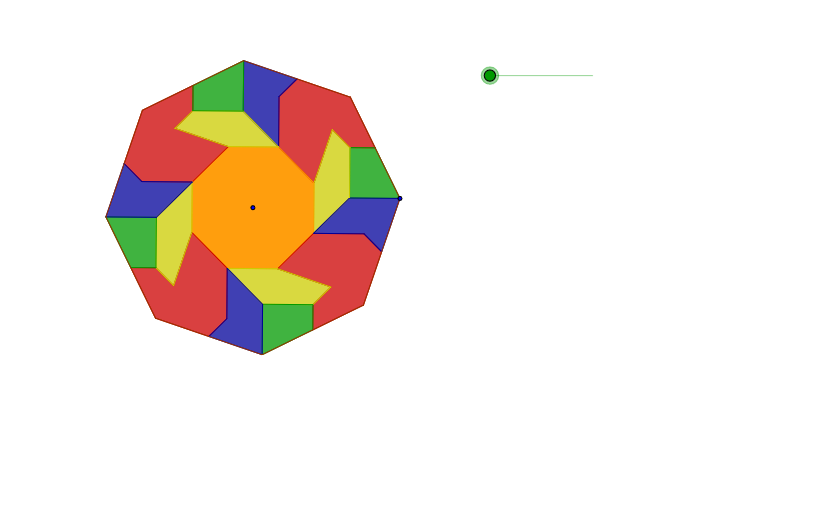
This example demonstrates how to construct polygon figures using rotation and symmetry operations. Key mathematical concepts include geometric transformations, symmetry, and polygon properties. Construction involves GeoGebra commands such as Rotate, Distance, Circle, Midpoint, etc. Suitable for middle or high school mathematics courses to learn geometric transformations and drawing techniques.
GeoGebra Commands & Parameters
Rotate(B, (t * 210°), B) → B'Rotate(B', 59.99999999999999°, A) → B''Rotate(B'', 59.99999999999999°, A) → B'''Rotate(B''', 59.99999999999999°, A) → B''''Rotate(B'''', 59.99999999999999°, A) → B'''''Rotate(B''''', 59.99999999999999°, A) → B''''''Rotate(B, 59.99999999999999°, A) → B'_1Rotate(B'_1, 59.99999999999999°, A) → B'_1'Rotate(B'_1', 59.99999999999999°, A) → B'_1''Rotate(B'_1'', 59.99999999999999°, A) → B'_1'''Rotate(B'_1''', 59.99999999999999°, A) → B'_1''''Rotate(B, 45°, A) → CRotate(C, 45°, A) → DRotate(D, 45°, A) → ERotate(E, 45°, A) → FRotate(F, 45°, A) → GRotate(G, 45°, A) → HRotate(H, 45°, A) → IDistance(B, C) → LCircle(B, l) → cMidpoint(C, B) → JCircle(J, B) → dIntersect(d, c, 2) → KRotate(B, 90°, K) → MPolygon(M, K, B, J) → P, m, k, b, jRotate(B, 225°, K) → NRotate(K, 45°, N) → OMidpoint(I, H) → VCircle(V, f) → gSegment(B, I) → hMidpoint(D, C) → QRotate(O, 45°, A) → RMirror(O, R) → SRotate(S, 315°, R) → TPolygon(Q, D, S, R, T) → U, q, d_1, s, r, t_1Distance(T, Q) → ddCircle(M, e) → pCircle(O, i) → c_1Intersect(c_1, p, 1) → WPolygon(O, W, M, K, N) → Y, o, w, m_1, k_1, nPolygon(R, O, W, M, J, C, Q, T) → Z, r_1, o_1, w_1, m_2, j_1, c_2, q_1, t_2Rotate(M, (t * 180°), J) → M'Rotate(K, (t * 180°), J) → K'Rotate(B, (t * 180°), J) → B'_2Rotate(J, (t * 180°), J) → J'Polygon(M', K', B'_2, J') → P', m', k', b'_2, j'Rotate(O, (t * 90°), K') → O'Rotate(W, (t * 90°), K') → W'Rotate(M, (t * 90°), K') → M'_1Rotate(K, (t * 90°), K') → K'_1Rotate(N, (t * 90°), K') → N'Polygon(O', W', M'_1, K'_1, N') → Y', o', w', m'_1, k'_1, n'Vector(N', K') → uTranslate(O', v) → O''Translate(W', v) → W''Translate(M'_1, v) → M'_1'Translate(K'_1, v) → K'_1'Translate(N', v) → N''Polygon(O'', W'', M'_1', K'_1', N'') → Y'', o'', w'', m'_1', k'_1', n''Rotate(Q, (t * 90°), B) → Q'Rotate(D, (t * 90°), B) → D'Rotate(S, (t * 90°), B) → S'Rotate(R, (t * 90°), B) → R'Rotate(T, (t * 90°), B) → T'Polygon(Q', D', S', R', T') → U', q', d', s', r', t'Vector(R', M') → zTranslate(Q', u_1) → Q''Translate(D', u_1) → D''Translate(S', u_1) → S''Translate(R', u_1) → R''Translate(T', u_1) → T''Polygon(Q'', D'', S'', R'', T'') → U'', q'', d'', s'', r'', t''Rotate(R, 45°, A) → A_1Rotate(A_1, 45°, A) → B_1Rotate(B_1, 45°, A) → C_1Rotate(C_1, 45°, A) → D_1Rotate(D_1, 45°, A) → E_1Polygon(O, R, A_1, B_1, C_1, D_1, E_1, N) → P_1, o_2, r_2, a_1, b_1, c_3, d_2, e_1, n_1Rotate(R, 90°, A) → R'_1Rotate(O, 90°, A) → O'_1Rotate(W, 90°, A) → W'_1Rotate(M, 90°, A) → M'_2Rotate(J, 90°, A) → J'_1Rotate(C, 90°, A) → C'Rotate(Q, 90°, A) → Q'_1Rotate(T, 90°, A) → T'_1Polygon(R'_1, O'_1, W'_1, M'_2, J'_1, C', Q'_1, T'_1) → Z', r'_1, o'_1, w'_1, m'_2, j'_1, c', q'_1, t'_1Rotate(R'_1, 90°, A) → R'_1'Rotate(O'_1, 90°, A) → O'_1'Rotate(W'_1, 90°, A) → W'_1'Rotate(M'_2, 90°, A) → M'_2'Rotate(J'_1, 90°, A) → J'_1'Rotate(C', 90°, A) → C''Rotate(Q'_1, 90°, A) → Q'_1'Rotate(T'_1, 90°, A) → T'_1'Polygon(R'_1', O'_1', W'_1', M'_2', J'_1', C'', Q'_1', T'_1') → Z'', r'_1', o'_1', w'_1', m'_2', j'_1', c'', q'_1', t'_1'Rotate(R'_1', 90°, A) → R'_1''Rotate(O'_1', 90°, A) → O'_1''Rotate(W'_1', 90°, A) → W'_1''Rotate(M'_2', 90°, A) → M'_2''Rotate(J'_1', 90°, A) → J'_1''Rotate(C'', 90°, A) → C'''Rotate(Q'_1', 90°, A) → Q'_1''Rotate(T'_1', 90°, A) → T'_1''Polygon(R'_1'', O'_1'', W'_1'', M'_2'', J'_1'', C''', Q'_1'', T'_1'') → Z''', r'_1'', o'_1'', w'_1'', m'_2'', j'_1'', c''', q'_1'', t'_1''Rotate(O'', 90°, A) → O'''Rotate(W'', 90°, A) → W'''Rotate(M'_1', 90°, A) → M'_1''Rotate(K'_1', 90°, A) → K'_1''Rotate(N'', 90°, A) → N'''Polygon(O''', W''', M'_1'', K'_1'', N''') → Y''', o''', w''', m'_1'', k'_1'', n'''Rotate(O''', 90°, A) → O''''Rotate(W''', 90°, A) → W''''Rotate(M'_1'', 90°, A) → M'_1'''Rotate(K'_1'', 90°, A) → K'_1'''Rotate(N''', 90°, A) → N''''Polygon(O'''', W'''', M'_1''', K'_1''', N'''') → Y'''', o'''', w'''', m'_1''', k'_1''', n''''Rotate(O'''', 90°, A) → O'''''Rotate(W'''', 90°, A) → W'''''Rotate(M'_1''', 90°, A) → M'_1''''Rotate(K'_1''', 90°, A) → K'_1''''Rotate(N'''', 90°, A) → N'''''Polygon(O''''', W''''', M'_1'''', K'_1'''', N''''') → Y''''', o''''', w''''', m'_1'''', k'_1'''', n'''''Rotate(M', 90°, A) → M''Rotate(K', 90°, A) → K''Rotate(B'_2, 90°, A) → B'_2'Rotate(J', 90°, A) → J''Polygon(M'', K'', B'_2', J'') → P'', m'', k'', b'_2', j''Rotate(M'', 90°, A) → M'''Rotate(K'', 90°, A) → K'''Rotate(B'_2', 90°, A) → B'_2''Rotate(J'', 90°, A) → J'''Polygon(M''', K''', B'_2'', J''') → P''', m''', k''', b'_2'', j'''Rotate(M''', 90°, A) → M''''Rotate(K''', 90°, A) → K''''Rotate(B'_2'', 90°, A) → B'_2'''Rotate(J''', 90°, A) → J''''Polygon(M'''', K'''', B'_2''', J'''') → P'''', m'''', k'''', b'_2''', j''''Rotate(Q'', 90°, A) → Q'''Rotate(D'', 90°, A) → D'''Rotate(S'', 90°, A) → S'''Rotate(R'', 90°, A) → R'''Rotate(T'', 90°, A) → T'''Polygon(Q''', D''', S''', R''', T''') → U''', q''', d''', s''', r''', t'''Rotate(Q''', 90°, A) → Q''''Rotate(D''', 90°, A) → D''''Rotate(S''', 90°, A) → S''''Rotate(R''', 90°, A) → R''''Rotate(T''', 90°, A) → T''''Polygon(Q'''', D'''', S'''', R'''', T'''') → U'''', q'''', d'''', s'''', r'''', t''''Rotate(Q'''', 90°, A) → Q'''''Rotate(D'''', 90°, A) → D'''''Rotate(S'''', 90°, A) → S'''''Rotate(R'''', 90°, A) → R'''''Rotate(T'''', 90°, A) → T'''''Polygon(Q''''', D''''', S''''', R''''', T''''') → U''''', q''''', d''''', s''''', r''''', t'''''Polygon(B, C, D, E, F, G, H, I) → Q_1, b_2, c_4, d_3, e_2, f_1, g_1, h_1, i_1
AI Drawing Prompt Reference
Draw a complex pattern composed of multiple regular polygons created through rotation and symmetry operations. Start by rotating a point around a center by 210 degrees, then repeatedly rotate the resulting points by 60 degrees. Next, rotate points around the center by 45 degrees to create symmetrical points. Connect these points to form multiple regular polygons, refine the shape using circles and intersection points, and finally create a complex geometric pattern with rotational and central symmetry.
The prompt above was compiled from the original drawing commands and is for reference only.