
Enneper Surface: Parametric Construction and Visualization
Loading the math board and drawing, please wait…
In collections
geometriadinamica.es
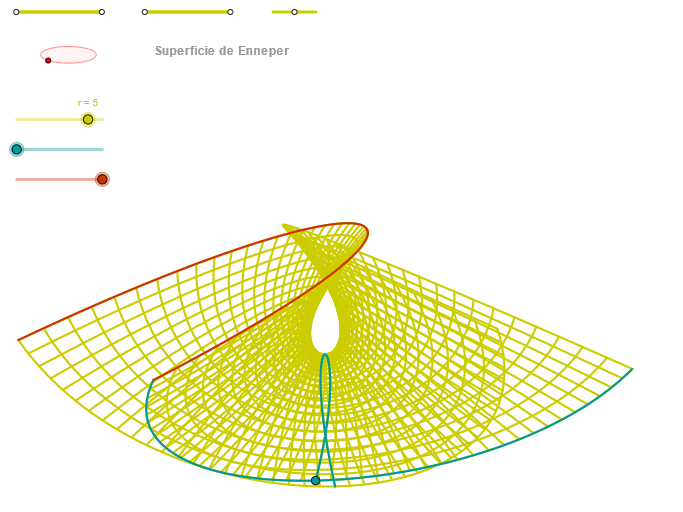
This GeoGebra example demonstrates the geometric shape of the Enneper surface and how it is generated in 3D by using parameter-driven construction. It highlights key ideas such as parametric equations for surfaces, coordinate geometry, and the use of auxiliary geometric objects to organize the build. The construction uses GeoGebra commands including Segment, Point, OrthogonalLine, Circle, Intersect, Ellipse, Angle, CurveCartesian, and Sequence. Segments and points define control geometry; OrthogonalLine captures right-angle constraints; Circle, Intersect, and Angle provide auxiliary relationships and measurements; Ellipse creates intermediate loci/sections; CurveCartesian renders the relevant curves in a Cartesian setting; Sequence manages the parameter progression (e.g., u/v values) that drives the step-by-step generation (objects like Q*, P*, q*, and step variables). Suitable for high school to university-level instruction and for workshops on parametric modeling and dynamic math visualization.
GeoGebra Commands & Parameters
Segment(Q5, Q6) → p5Point(p5) → P5Segment(Q3, Q4) → p2Point(p2) → P3Segment(P3, Q4) → p4Point(p4) → P4Segment(Q1, Q2) → p1Point(p1) → P1Segment(P1, Q2) → p3Point(p3) → P2OrthogonalLine(C, xAxis) → zz2Circle(C, 0.62) → zz0Intersect(zz0, zz2, 1) → ZZ4Intersect(zz0, zz2, 2) → ZZ3Ellipse(ZZ3, ZZ4, 0.65) → zElipse2Point(zElipse2) → ZIntersect(zElipse2, zz2) → ZZ7, ZZ8Angle(ZZ8, C, Z) → zAngIncOrthogonalLine(C, yAxis) → zz1Intersect(zz0, zz1, 2) → ZZ2Intersect(zz0, zz1, 1) → ZZ1Ellipse(ZZ1, ZZ2, 0.65) → zElipse1Point(zElipse1) → XYIntersect(zElipse1, zz1) → ZZ5, ZZ6Angle(ZZ6, C, XY) → zAngRotCurveCartesian(((r / 8 * (u - u^(3) / 3)) * sin(zAngRot)), (r / 8 * ((((-(u - u^(3) / 3)) * cos(zAngRot)) * sin(zAngInc)) + (u^(2) * cos(zAngInc)))), u, u1, u2) → curva1Segment(ZZ5, ZZ6) → zz4Segment(ZZ7, ZZ8) → zz3Intersect(zElipse2, zElipse1, 1) → zPunto1Intersect(zElipse2, zElipse1, 4) → zPunto2Segment(zPunto1, zPunto2) → zSeg2CurveCartesian((r / 8 * (((β - β^(3) / 3 + (β * v^(2))) * sin(zAngRot)) + ((v - v^(3) / 3 + (v * β^(2))) * cos(zAngRot)))), (r / 8 * ((((-(β - β^(3) / 3 + (β * v^(2)))) * cos(zAngRot)) * sin(zAngInc)) + (((v - v^(3) / 3 + (v * β^(2))) * sin(zAngRot)) * sin(zAngInc)) + ((β^(2) - v^(2)) * cos(zAngInc)))), v, v1, v2) → curva2CurveCartesian((r / 8 * (((u - u^(3) / 3 + (u * α^(2))) * sin(zAngRot)) + ((α - α^(3) / 3 + (α * u^(2))) * cos(zAngRot)))), (r / 8 * ((((-(u - u^(3) / 3 + (u * α^(2)))) * cos(zAngRot)) * sin(zAngInc)) + (((α - α^(3) / 3 + (α * u^(2))) * sin(zAngRot)) * sin(zAngInc)) + ((u^(2) - α^(2)) * cos(zAngInc)))), u, u1, u2) → a1Sequence(CurveCartesian[(r / 8 * (((u - u^(3) / 3 + (u * v^(2))) * sin(zAngRot)) + ((v - v^(3) / 3 + (v * u^(2))) * cos(zAngRot)))), (r / 8 * ((((-(u - u^(3) / 3 + (u * v^(2)))) * cos(zAngRot)) * sin(zAngInc)) + (((v - v^(3) / 3 + (v * u^(2))) * sin(zAngRot)) * sin(zAngInc)) + ((u^(2) - v^(2)) * cos(zAngInc)))), u, u1, u2], v, v1, v2, paso) → list2Sequence(CurveCartesian[(r / 8 * (((u - u^(3) / 3 + (u * v^(2))) * sin(zAngRot)) + ((v - v^(3) / 3 + (v * u^(2))) * cos(zAngRot)))), (r / 8 * ((((-(u - u^(3) / 3 + (u * v^(2)))) * cos(zAngRot)) * sin(zAngInc)) + (((v - v^(3) / 3 + (v * u^(2))) * sin(zAngRot)) * sin(zAngInc)) + ((u^(2) - v^(2)) * cos(zAngInc)))), v, v1, v2], u, u1, u2, paso) → list1
AI Drawing Prompt Reference
Create a 3D visualization of the Enneper surface, a parametric saddle-shaped surface. Start with control segments and points, then construct two orthogonal auxiliary circles and ellipses to determine rotation and tilt angles via intersections. Use these angles to draw two primary curves, then generate a grid of curves along both parameter directions to form the surface mesh. The result shows a symmetric, self-intersecting surface with a dynamic grid, illustrating parametric construction.
The prompt above was compiled from the original drawing commands and is for reference only.