
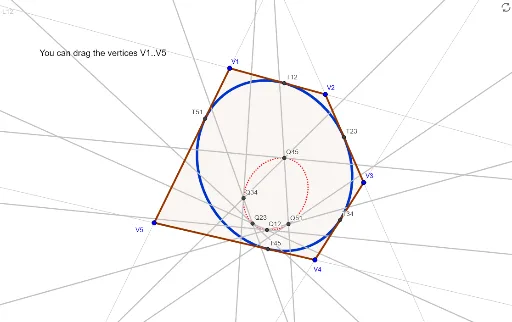
Ellipse inscribed in a pentagon
Loading the math board and drawing, please wait…
This example demonstrates how to draw an ellipse inscribed within a pentagon. Key math concepts include ellipses, polygons, coordinate geometry, and geometric construction. The construction utilizes GeoGebra commands such as Corner (vertices), Line (segments), Intersect (points of intersection), Polygon (polygons), Conic (conic sections), and Tangent (tangents). Suitable for high school and above, it helps understand the relationship between ellipses and polygons and their construction methods.
GeoGebra Commands & Parameters
Corner(5) → screenDim1Line(V1, V2) → L12Line(V2, V3) → L23Line(V3, V4) → L34Line(V4, V5) → L45Line(V5, V1) → L51Intersect(rL1, rL5) → P15Intersect(rL1, rL2) → P12Intersect(rL1, rL3) → P13Intersect(rL1, rL4) → P14Intersect(rL2, rL3) → P23Intersect(rL2, rL4) → P24Intersect(rL2, rL5) → P25Intersect(rL3, rL4) → P34Intersect(rL3, rL5) → P35Intersect(rL4, rL5) → P45Polygon(V1, V2, V3, V4, V5) → poly1, v1, v2, v3, v4, v5Conic(Q12, Q23, Q34, Q45, Q51) → dualconicTangent(Q45, dualconic) → td45,Tangent(Q51, dualconic) → td51,Tangent(Q12, dualconic) → td12,Tangent(Q23, dualconic) → td23,Tangent(Q34, dualconic) → td34,Conic(T12, T23, T34, T45, T51) → elli
AI Drawing Prompt Reference
Draw a pentagon and construct an inscribed ellipse. Start by defining five vertices and connecting them sequentially to form five sides. Then, compute the intersection points of each pair of sides, yielding ten points. Next, form the pentagon using the five vertices. After that, use certain points on the sides (such as intersections of each side with the extension of an opposite side) to construct an auxiliary conic, and draw tangents to this conic from those points. Finally, the ellipse formed by these tangents is the desired inscribed ellipse.
The prompt above was compiled from the original drawing commands and is for reference only.