
The Harmonic Triangle: Interactive Sine and Geometric Construction
Loading the math board and drawing, please wait…
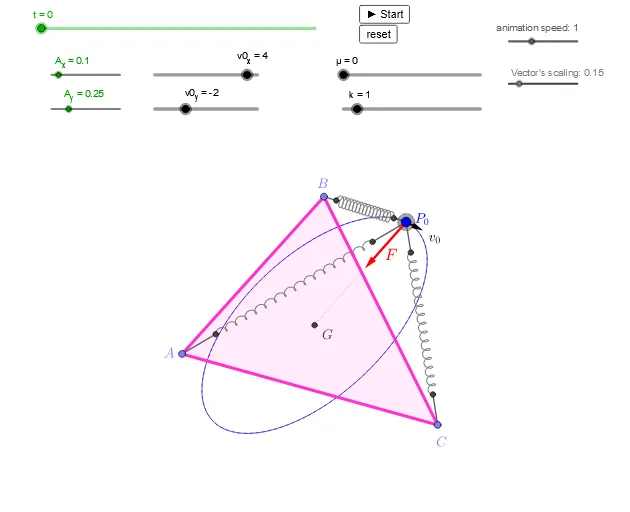
This GeoGebra example demonstrates a dynamic 'harmonic triangle' that integrates sine curves, triangles, circles, and vectors to visualize harmonic relationships in geometry. Core mathematical concepts include sine functions, triangle side-angle relations, vector operations, and parametric curves. The construction uses commands such as Point, If, Distance, Polygon, Vector, ImplicitCurve, CurveCartesian, Angle, Segment, and Circle, with objects like points (P0, B, C, A), variables (v0_x, v0_y, m, k), and sliders (t, spd) for animation. Suitable for high school and college students exploring trigonometry and geometry, and useful for teachers demonstrating harmonic series or wave phenomena.
GeoGebra Commands & Parameters
Point(xAxis) → Ptx0If(((12 * k) * m) - μ^(2) > 0, 1, ((12 * k) * m) - μ^(2) ≟ 0, 2, ((12 * k) * m) - μ^(2) < 0, 3) → typeIf(type ≟ 1, yt1(w), type ≟ 2, yt2(w), type ≟ 3, yt3(w)) → ytIf(type ≟ 1, xt1(w), type ≟ 2, xt2(w), type ≟ 3, xt3(w)) → xtDistance(P, A) → aDistance(P, B) → bDistance(P, C) → cPolygon(A, B, C) → t1, c_1, a_1, b_1Vector(P, P + (vTsca * (vA + vB + vC))) → vTotImplicitCurve(f1) → ff1CurveCartesian(uxt(u), uyt(u), u, 0, T) → uPcurvVector(P, P + ((k * vTsca) * ((-3 * x(P)) + x(A) + x(B) + x(C), 0))) → vxVector(P, P + ((k * vTsca) * (0, (-3 * y(P)) + y(A) + y(B) + y(C)))) → vyVector(P, A) → vPAVector(P, B) → vPBVector(P, C) → vPCCurveCartesian(xt(u), yt(u), u, 0, If[μ ≟ 0, T, (12 * T)]) → PcurvAngle(A' + (1, 0), A', A'') → αAngle(B' + (1, 0), B', B'') → βAngle(C' + (1, 0), C', C'') → γSegment(B, B') → bp1Segment(B'', P) → bp3Segment(C, C') → cp1Segment(C'', P) → cp3Segment(A, A') → ap1Segment(A'', P) → ap3CurveCartesian((cos(α) * (x(A') + (A_x * (1 - cos((sω * u)) + (stpA * u))) - x(A'))) - (((sin(α) * A_y) * (1 - a / dc)) * sin((sω * u))) + x(A'), (sin(α) * (x(A') + (A_x * (1 - cos((sω * u)) + (stpA * u))) - x(A'))) + (((cos(α) * A_y) * (1 - a / dc)) * sin((sω * u))) + y(A'), u, 0, sn) → sprACurveCartesian((cos(β) * (x(B') + (A_x * (1 - cos((sω * u)) + (stpB * u))) - x(B'))) - (((sin(β) * A_y) * (1 - b / dc)) * sin((sω * u))) + x(B'), (sin(β) * (x(B') + (A_x * (1 - cos((sω * u)) + (stpB * u))) - x(B'))) + (((cos(β) * A_y) * (1 - b / dc)) * sin((sω * u))) + y(B'), u, 0, sn) → sprBCurveCartesian((cos(γ) * (x(C') + (A_x * (1 - cos((sω * u)) + (stpC * u))) - x(C'))) - (((sin(γ) * A_y) * (1 - c / dc)) * sin((sω * u))) + x(C'), (sin(γ) * (x(C') + (A_x * (1 - cos((sω * u)) + (stpC * u))) - x(C'))) + (((cos(γ) * A_y) * (1 - c / dc)) * sin((sω * u))) + y(C'), u, 0, sn) → sprCVector(P0, P0 + (vTsca * (v0_x, v0_y))) → v0Segment(P, G) → pgPoint(litx) → Ptx1Point(litx) → Ptx2Point(litx) → Ptx3Circle(P, rring1) → cring1Circle(P, rring2) → cring2
AI Drawing Prompt Reference
Draw a dynamic 'harmonic triangle' on a coordinate plane. Place a movable reference point, and construct a triangle with three vertices connected to this point. From the reference point, draw three vectors pointing to the triangle's vertices, and also a resultant vector representing a weighted sum of these three vertex vectors. Inside or around the triangle, draw a parametric curve whose shape depends on the side lengths and angles, and which evolves as a slider changes. Additionally, draw two concentric circles centered at the reference point, and at each triangle vertex, draw small arcs or curves indicating sine-wave oscillations related to the angles. The overall figure should include axes, the triangle, vectors, curves, and circles, with an animation slider to control speed.
The prompt above was compiled from the original drawing commands and is for reference only.