
Ellipse-Hyperbola Envelopes
Loading the math board and drawing, please wait…
In collections
Conics Doug Kuhlmann
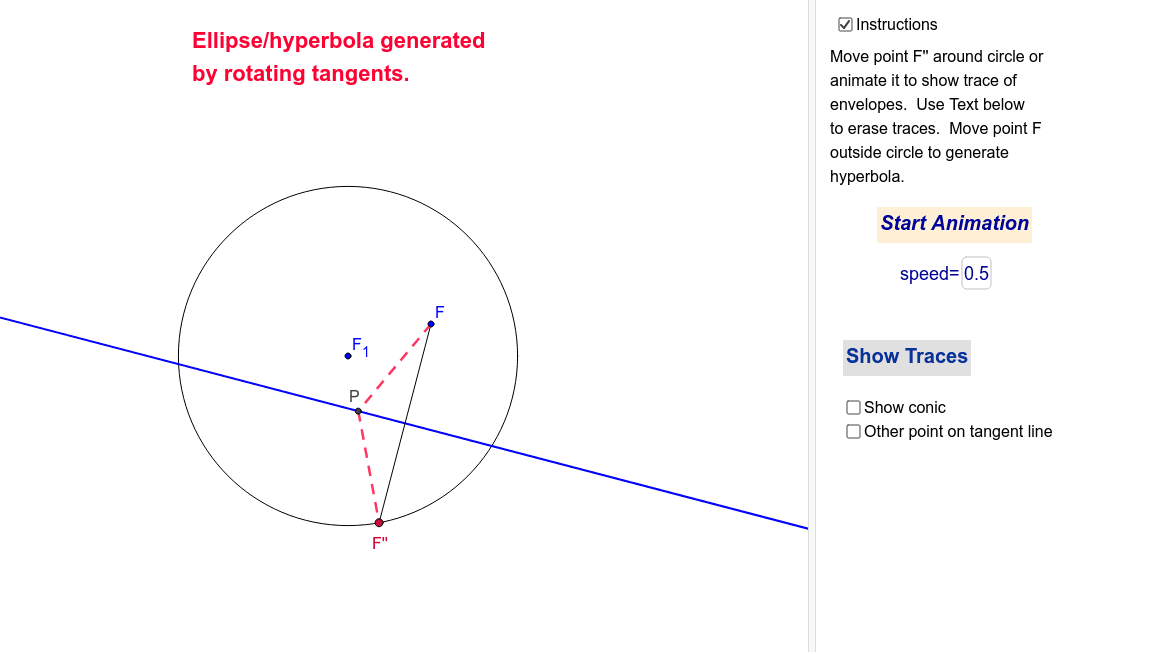
This example demonstrates the envelopes of ellipses and hyperbolas. Key mathematical concepts include the geometric properties of ellipses and hyperbolas. Using GeoGebra commands such as Circle, Point, Segment, Line, LineBisector, Intersect, and Locus, the envelope can be constructed. Suitable for high school mathematics education and learning.
GeoGebra Commands & Parameters
Circle(F_1, B) → cPoint(c) → F''Segment(F'', F) → aLine(F'', F_1) → bLineBisector(a) → eIntersect(e, b) → PLocus(P, F'') → loc1Segment(F, P) → gSegment(P, F'') → jPoint(e) → NSegment(F, N) → hSegment(N, F'') → iSegment(N, F_1) → kIf(togT ≟ 1, "Erase Traces", "Show Traces") → TracesIf(togA ≟ 1, "Stop Animation", "Start Animation") → AnimateIntersect(e, b) → TTextfield(speed) → SPD
AI Drawing Prompt Reference
Draw the envelope of ellipses and hyperbolas. Start by drawing a circle c with center F1 and point B. Then, take a point F' on circle c, draw line segment a from F'' to F, and construct the perpendicular bisector e of a. The intersection of e and line b is point P, whose locus is loc1. Next, draw line segments from F to P, P to F'', F to N, N to F'', and N to F1. Finally, use switches to control the display of the locus and the animation.
The prompt above was compiled from the original drawing commands and is for reference only.