
Elements of a Rhombus
Loading the math board and drawing, please wait…
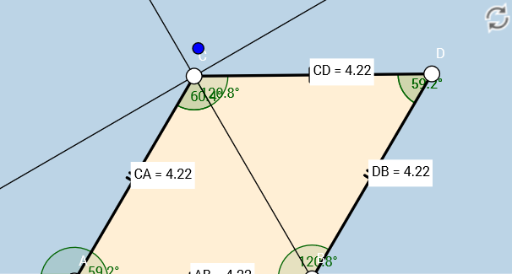
This example demonstrates the fundamental elements and properties of a rhombus. It involves core mathematical concepts such as polygons, parallelograms, triangles, angles, distances, and linear regression. The construction uses GeoGebra commands like Segment, Circle, Point, Intersect, Polygon, Distance, AngularBisector, and Angle. Suitable for middle school students and above to learn about the geometric characteristics of rhombuses.
GeoGebra Commands & Parameters
Segment(A, B) → fCircle(A, B) → cPoint(c) → CCircle(C, A) → dCircle(B, A) → eIntersect(d, e, 2) → DSegment(B, D) → gSegment(D, C) → hSegment(C, A) → iPolygon(A, B, D, C) → poly1, a, b, d_1, c_1Distance(D, B) → distanceDBDistance(C, A) → distanceCADistance(A, B) → distanceABDistance(C, D) → distanceCDAngularBisector(i, h) → j, kAngle(i, k) → αAngle(C, D, B) → βAngle(C, A, B) → γAngle(poly1) → δ, ε, ζ, η
AI Drawing Prompt Reference
Draw a rhombus to demonstrate its fundamental elements and properties. Start by drawing a side, then create a circle with this side as the diameter. Next, draw two equal circles centered at the endpoints of this side, find their intersections, and connect these points to form the rhombus. Calculate and label the lengths of the sides and key angles, then draw the angle bisectors and annotate the interior and exterior angles.
The prompt above was compiled from the original drawing commands and is for reference only.