
Trapezoid with Incircle and Quadratic Functions: A Multi-Element Construction
Loading the math board and drawing, please wait…
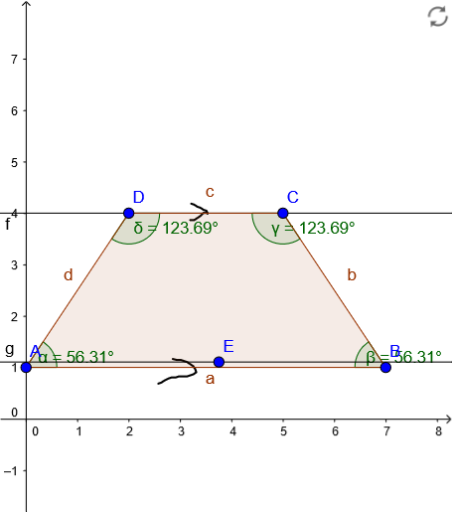
This GeoGebra example demonstrates a comprehensive geometric construction featuring a trapezoid, an incircle (inscribed circle), quadratic function graphs, and additional elements like bar charts and pie charts. The core mathematical concepts include properties of trapezoids, relationships between polygons and their incircles, characteristics of quadratic functions, and classification of scalene triangles. The construction is built using GeoGebra commands: Polygon creates quadrilateral poly1 with vertices A, B, C, D; Line draws the sides; Angle labels interior angles α, β, γ, δ; PolyLine constructs polyline paths; auxiliary objects such as E, g, f, and stroke1/2/3 enhance the visual representation. This example is suitable for middle and high school mathematics education, ideal for integrated lessons connecting geometry and functions, fostering understanding of interrelations among mathematical topics, and serving as a dynamic teaching or exercise design tool.
GeoGebra Commands & Parameters
Polygon(A, B, C, D) → poly1, a, b, c, dLine(D, c) → fLine(E, a) → gAngle(poly1) → α, β, γ, δPolyLine((3.213333333333334, 4.185000000000002), (NaN, NaN), (3.213333333333334, 4.185000000000002), (3.273333333333334, 4.165000000000002), (3.333333333333334, 4.125000000000002), (3.393333333333334, 4.105000000000002), (3.453333333333334, 4.065000000000002), (3.513333333333334, 4.045000000000002), (3.5333333333333337, 3.9850000000000017), true) → stroke1PolyLine((3.5333333333333337, 4.005000000000002), (NaN, NaN), (3.5333333333333337, 4.005000000000002), (3.453333333333334, 4.005000000000002), (3.393333333333334, 3.9450000000000016), (3.333333333333334, 3.9050000000000016), (3.273333333333334, 3.8650000000000015), (3.193333333333334, 3.8650000000000015), true) → stroke2PolyLine((2.8533333333333335, 1.1649999999999996), (NaN, NaN), (3.313333333333334, 0.9049999999999995), (3.253333333333334, 0.8649999999999994), (3.193333333333334, 0.8449999999999994), (3.1333333333333337, 0.8249999999999994), (3.0533333333333337, 0.8249999999999994), (2.9733333333333336, 0.8249999999999994), (2.9133333333333336, 0.8049999999999995), (2.8333333333333335, 0.8049999999999995), (2.7733333333333334, 0.7849999999999995), (2.6933333333333334, 0.7449999999999994), (2.8533333333333335, 1.1649999999999996), (2.6333333333333337, 0.7049999999999994), (2.5733333333333337, 0.6849999999999994), true, (2.9333333333333336, 1.1449999999999996), (3.0133333333333336, 1.1449999999999996), (3.0733333333333337, 1.1249999999999998), (3.1333333333333337, 1.1049999999999998), (3.193333333333334, 1.0649999999999997), (3.253333333333334, 1.0249999999999997), (3.293333333333334, 0.9649999999999995)) → stroke3
AI Drawing Prompt Reference
Draw a trapezoid with four vertices, labeling its four interior angles. Inside the trapezoid, place an incircle tangent to all sides. Add two auxiliary lines: one parallel to the base and one parallel to a leg. Also include two quadratic function curves on the same coordinate plane. Finally, add three polyline strokes as decorative or annotation elements, one inside the trapezoid and two below it, to enhance the visual presentation. The overall composition combines geometric shapes, function graphs, and auxiliary markings for educational purposes.
The prompt above was compiled from the original drawing commands and is for reference only.