
Orthocenter of a Triangle by Amanda
Loading the math board and drawing, please wait…
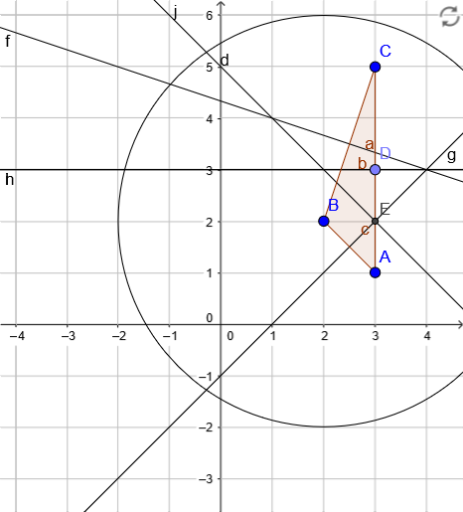
This example demonstrates how to construct the orthocenter of a triangle using GeoGebra, including related geometric elements like altitudes and angle bisectors. Core math concepts involve triangle geometry, analytical geometry, and properties of perpendicular lines. Construction highlights the use of commands such as Polygon, LineBisector, Circle, Point, and Intersect. Suitable for high school mathematics education or for geometry enthusiasts.
GeoGebra Commands & Parameters
Polygon(A, B, C) → poly1, c, a, bLineBisector(a) → fLineBisector(c) → gLineBisector(b) → hLineBisector(b) → iCircle(B, Segment[C, A]) → dPoint(b) → DLineBisector(D, B) → jIntersect(g, j) → E
AI Drawing Prompt Reference
Draw a triangle and construct the angle bisectors of its three sides. Then, draw a circle with one side as the diameter. The intersection points of the circle with the angle bisectors are connected to the opposite vertices. The lines connecting these points to the vertices are perpendicular to the opposite sides, forming the orthocenter and altitudes of the triangle.
The prompt above was compiled from the original drawing commands and is for reference only.