
Constructing the Orthocenter of a Triangle by Amanda
Loading the math board and drawing, please wait…
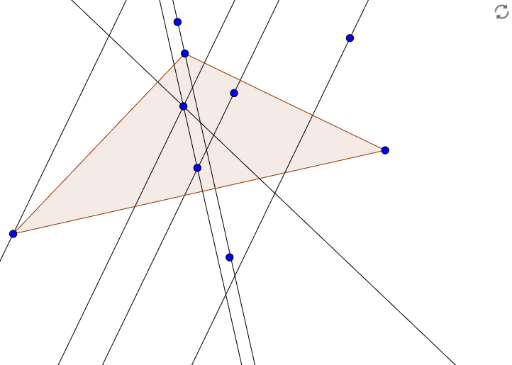
This GeoGebra example demonstrates the dynamic construction of the orthocenter of a triangle, visually illustrating the concurrency of the three altitudes at a single point H. The core mathematical concepts covered include triangle geometry, altitudes, perpendicular lines, orthocenter, and triangle centers. Construction highlights: the Polygon command is used to create triangle poly1 from vertices A, B, and C; the OrthogonalLine command constructs altitudes relative to the triangle’s sides and auxiliary lines a, b, c, d; points D, E, F, G, H, I and objects c_1, a_1, b_1, f, g, h, i, j, k, l support the step-by-step geometric construction and intersection calculations. This resource is suitable for middle school and high school geometry instruction, triangle center exploration, and interactive classroom demonstrations.
GeoGebra Commands & Parameters
Polygon(A, B, C) → poly1, c_1, a_1, b_1OrthogonalLine(A, a_1) → fOrthogonalLine(C, c_1) → gOrthogonalLine(F, c_1) → hOrthogonalLine(G, b_1) → iOrthogonalLine(G, c_1) → jOrthogonalLine(H, a_1) → kOrthogonalLine(I, c_1) → l
AI Drawing Prompt Reference
Draw a triangle ABC, then construct perpendicular lines from point A to side BC, from point C to side AB, from point F to side BC, from point G to side AB, from point H to side AC, and from point I to side AC. The intersection of these perpendicular lines is the orthocenter H of the triangle.
The prompt above was compiled from the original drawing commands and is for reference only.