
Dynamic Illustration of Two Squares and Concurrent Lines
Loading the math board and drawing, please wait…
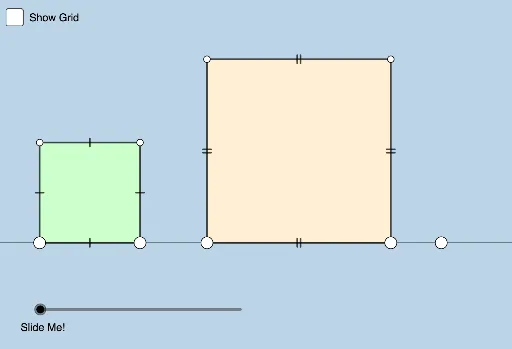
This example demonstrates a problem posed by Antonio Gutierrez. It shows two squares and their relationship with concurrent lines. Key mathematical concepts include the properties of squares, the definition of concurrent lines, and their geometric construction. Using GeoGebra commands such as Line, Point, Polygon, Intersect, Segment, and Dilate, the geometry elements can be dynamically modified and observed. Suitable for middle school and above students or teachers for teaching and learning.
GeoGebra Commands & Parameters
Line(A, B) → jPoint(j) → GPoint(j) → FPolygon(F, G, 4) → poly2, k, l, m, n, H, ILine(A, H) → pPoint(j) → EPolygon(A, E, 4) → poly1, f, g, h, i, C, DLine(D, G) → qIntersect(p, q) → JLine(I, E) → rLine(C, F) → sSegment(G, H) → tSegment(H, I) → aSegment(I, F) → bSegment(E, C) → cSegment(C, D) → dSegment(D, A) → eDilate(A, If[0 < o ≤ 1, 1 - o, 0], H) → A'Segment(A, A') → f_1Dilate(D, If[1 < o ≤ 2, 2 - o, 0], J) → D'Segment(D, D') → g_1Dilate(J, If[2 < o ≤ 3, 3 - o, 0], G) → J'Segment(J, J') → h_1Dilate(I, If[3 < o ≤ 4, 4 - o, 0], J) → I'Segment(I, I') → i_1Dilate(J, If[4 < o ≤ 5, 5 - o, 0], E) → J'_1Segment(J, J'_1) → j_1Intersect(q, p) → KDilate(C, If[5 < o ≤ 6, 6 - o, 0], J) → C'Segment(C, C') → k_1Dilate(J, If[6 < o ≤ 7, 7 - o, 0], F) → J'_2Segment(J, J'_2) → l_1Segment(A, E) → m_1Segment(F, G) → n_1
AI Drawing Prompt Reference
Draw two squares and show the relationship between them and several lines that intersect at a single point. Start by drawing a line segment, then create two points on this segment and use them to draw the first square. Next, from one vertex of the first square, draw a second line segment, create two points on it, and draw the second square. Finally, draw two line segments connecting opposite vertices of the squares and mark their intersection point.
The prompt above was compiled from the original drawing commands and is for reference only.