
Dynamic Illustration of Similar Figures
Loading the math board and drawing, please wait…
In collections
Similarity & Right Triangle Trigonometry
Similarity, Right Triangles, and Trigonometry (SRT) Cluster
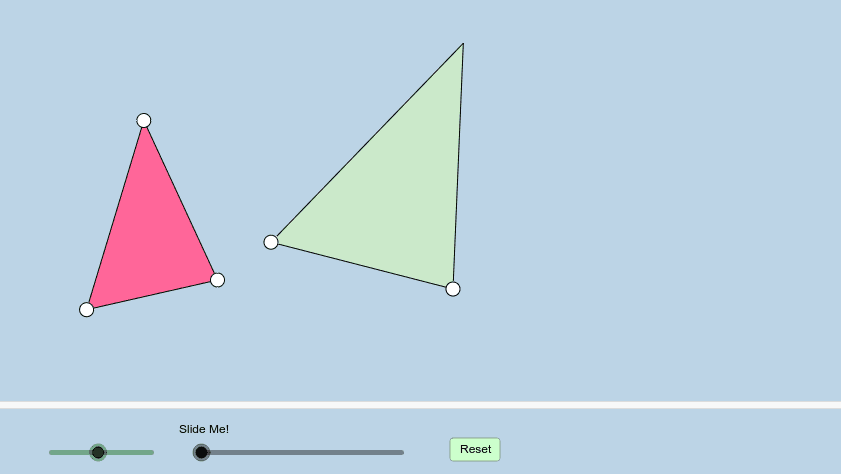
This example dynamically illustrates the definition of what it means for any two figures (triangles in this case) to be similar. It covers core math concepts like similarity criteria, properties of similar triangles, and geometric transformations (rotation, translation, dilation). Constructed using GeoGebra commands like Segment, Circle, Point, Angle, Rotate, Ray, Intersect, Line, Dilate, Vector, Polygon, Translate, If, Mirror. Suitable for high school students learning about similar figures and geometric transformations.
GeoGebra Commands & Parameters
Segment(A, B) → aSegment(B, C) → bSegment(C, A) → cCircle(D, (k * a)) → dPoint(d) → ESegment(D, E) → eCircle(E, (k * b)) → fAngle(A, B, C) → αRotate(D, α, E) → D'Angle(D, E, D') → βRay(E, D') → gIntersect(f, g, 1) → FAngle(C, A, B) → γRotate(E, (-γ), D) → E'Angle(E', D, E) → δRay(D, E') → hSegment(D, E') → iSegment(E', E) → jLine(E, D') → lLine(E, D') → nCircle(D, (k * c)) → pRay(D, E') → mIntersect(p, m, 1) → GSegment(E, G) → qSegment(D, G) → rDilate(D, If[0 < s ≤ 1, 1 - s], A) → D'_1Vector(D, D'_1) → uPolygon(A, C, B) → poly1, b_1, a_1, c_1Polygon(D, E, G) → poly2, g_1, d_1, e_1Translate(D, u) → D'_2Translate(E, u) → E'_1Translate(G, u) → G'Polygon(D'_2, E'_1, G') → poly2', g', d'_2, e'_1Vector(D, A) → vTranslate(D, v) → D'_3Translate(E, v) → E'_2Translate(G, v) → G'_1Polygon(D'_3, E'_2, G'_1) → poly2'_1, g'_1, d'_3, e'_2Segment(D'_1, G') → tSegment(E'_1, D'_1) → h_1Segment(A, G'_1) → i_1Segment(G'_1, E'_2) → j_1Segment(E'_2, A) → k_1Angle(C, A, E'_2) → εIf(ε > γ, ε - γ, γ - ε) → ζRotate(D'_3, If[1 < s ≤ 2, ((-(s - 1)) * ζ), (-ζ)], A) → HRotate(E'_2, If[1 < s ≤ 2, ((-(s - 1)) * ζ), (-ζ)], A) → IRotate(G'_1, If[1 < s ≤ 2, ((-(s - 1)) * ζ), (-ζ)], A) → JPolygon(H, I, J) → poly3, j_2, h_2, i_2Segment(A, J) → l_1Segment(A, I) → m_1Segment(I, J) → n_1Dilate(J, If[2 < s ≤ 3, 3 - s, 0], C) → J'Dilate(I, If[2 < s ≤ 3, 3 - s, 0], B) → I'Segment(I', J') → p_1Angle(A, I, J) → θAngle(D'_2, E'_1, G') → ιAngle(J, A, I) → λAngle(G', D'_1, E'_1) → μPolygon(A, J', I') → poly4, i', a_2, j'Segment(G'_1, E'_2) → q_1Segment(G', E'_1) → f_1Rotate(D'_3, ((s - 1) * ζ), A) → KRotate(D'_3, If[1 < s ≤ 2, ((s - 1) * ζ), ζ], A) → LRotate(E'_2, If[1 < s ≤ 2, ((s - 1) * ζ), ζ], A) → MRotate(G'_1, If[1 < s ≤ 2, ((s - 1) * ζ), ζ], A) → NPolygon(L, M, N) → poly5, n_2, l_2, m_2Dilate(M, If[2 < s ≤ 3, 3 - s, 0], B) → M'Dilate(N, If[2 < s ≤ 3, 3 - s, 0], C) → N'Segment(M', N') → r_1Polygon(A, M', N') → poly6, n', a_3, m'Angle(A, M', N') → οAngle(A, M, N) → ρSegment(A, M) → t_1Segment(M, N) → b_2Segment(A, N) → c_2Angle(B, A, C) → σAngle(G, E, D) → τAngle(N, M, A) → υAngle(N', M', A) → ϕLine(E, G) → s_1Mirror(D, q) → D'_4Mirror(E, q) → E'_3Mirror(G, q) → G'_2Polygon(D'_4, E'_3, G'_2) → poly2'_2, g'_2, d'_4, e'_3Segment(E, D'_4) → f_2Segment(D'_4, G) → g_2
AI Drawing Prompt Reference
Draw two similar triangles with a slider to control the scale factor, showing the relationships between corresponding sides and angles. Start by drawing a triangle, then create a second triangle at a scaled proportion from a vertex. Transform the second triangle using rotation and translation to align it with the first, labeling key angles and transformation steps, and finally illustrate the properties of similar triangles and geometric transformations.
The prompt above was compiled from the original drawing commands and is for reference only.